An OCR API that returns data you can verify
One REST call returns structured JSON where every value carries a box, a quad and a verification verdict. Bearer auth, declared fields or autoFields, async jobs, signed webhooks.
Most OCR APIs hand you a wall of text and a confidence number for the whole page. You still have to find the invoice total, parse it, and hope it landed in the right place. The OCR API in space-ocr does the structuring for you: one POST with an image and the fields you want — or autoFields when you would rather have the API propose the schema — and you get back named values as JSON.
The part that matters for production is what rides along with each value. data.cells is keyed by the same paths as the schema you declared, and each entry holds the box the value was read from, the four corners of that box, a verified verdict and the reasons behind it. So your pipeline doesn't have to trust a model's word — it can check each value against where it actually sits on the document, and work through data.review.flagged for the ones that didn't line up.
A real response you can inspect
Hover any field below — the box on the invoice is where that value was read. This is a real parsed result: the billing name ソジュハンザン海物語様, the amount due ¥84,263, the total ¥46,752, each line item, all returned with their own box and the evidence behind the cross-check. Nothing here is mocked.
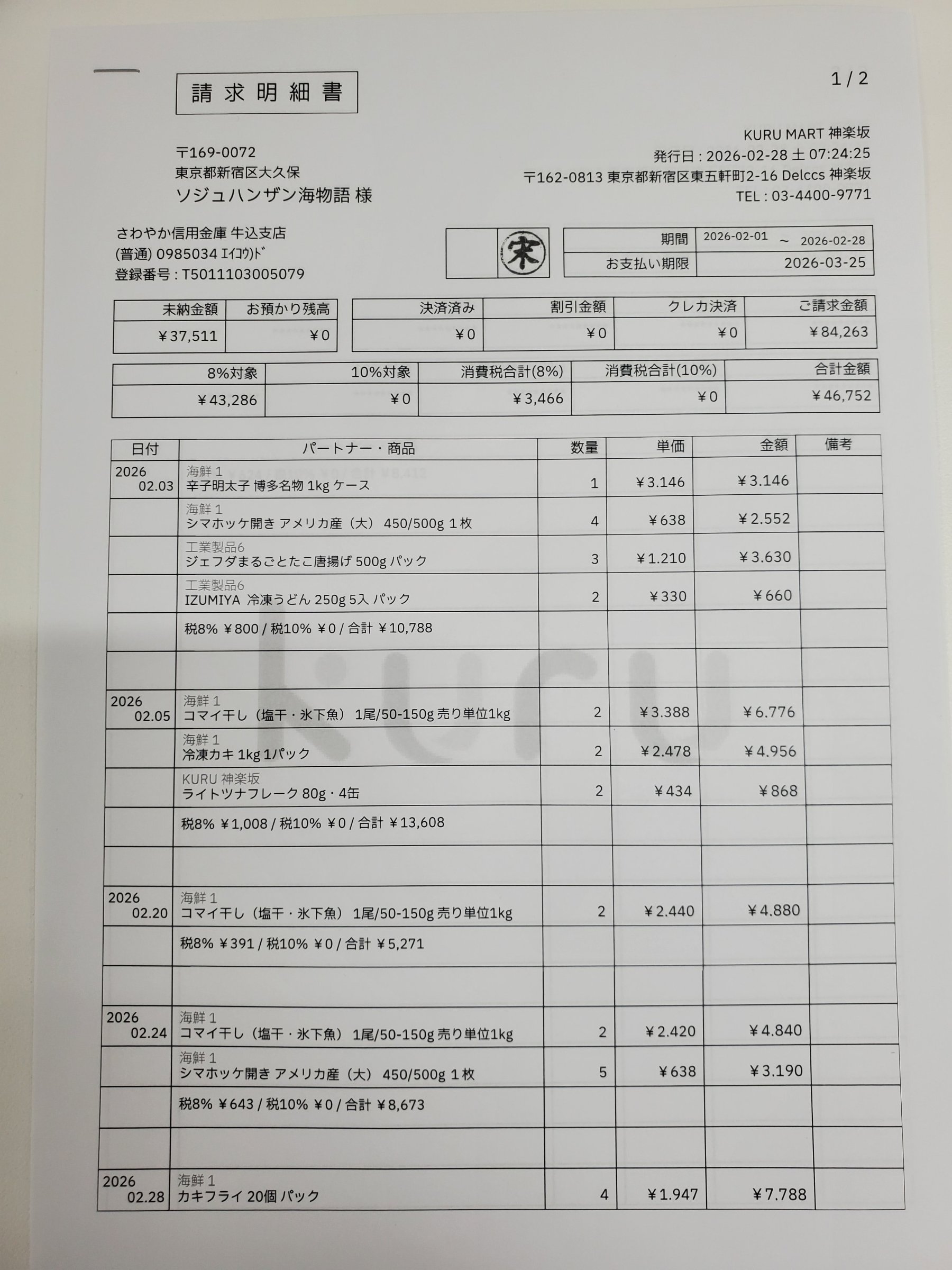
Each value with a box carries a verified on-page location — in data.cells[path], that is box + 4-point quad + evidence.match_ratio — on a 0–1000 normalized grid (0,0 top-left → 1000,1000 bottom-right), the same shape the live API returns. Hover a field to trace it back to the pixels it came from.
How the OCR API works in space-ocr
Authenticate with a Bearer token — your key is prefixed spocr_ — against the base URL https://api.space-ocr.com. Send one raster image to POST /ocr/fields as a URL or base64 (the public API takes images — JPEG, PNG, GIF, BMP, TIFF, WebP — so for a PDF you send page images). Declare your own fields, or set autoFields and let the API propose them, and you get back { status: 'success', data: { values, cells, review, image } }.
The coordinates aren't invented by the model. An OCR pass is the only source of geometry; the model returns values, and a character matcher then aligns each value against the symbols actually detected on the page. What comes out of that lands in data.cells[path]: box and quad for the location, verified as the verdict, review with the reasons when something didn't line up, and evidence — text_match, match_ratio, printed_text — as the supporting detail. Coordinates are evidence of where a value came from, not proof that it is right: two engines can still agree on the same misread, so keep your own business checks. All coordinates are normalized to a 0–1000 grid, and data.image gives the width and height to convert them to pixels. Every response also carries an X-Request-Id header, and errors come back as { error: { code, message, requestId } }.
curl -s https://api.space-ocr.com/ocr/fields \
  -H "Authorization: Bearer $SPACE_OCR_API_KEY" \
  -H "Content-Type: application/json" \
  -d '{
    "image": "https://example.com/invoice.png",
    "imageType": "url",
    "fields": [
      { "name": "vendor", "type": "string", "required": true },
      { "name": "invoice_date", "type": "date", "required": true },
      { "name": "total", "type": "number", "required": true, "min": 0 },
      { "name": "items", "type": "array", "children": [
        { "name": "description", "type": "string" },
        { "name": "amount", "type": "number" }
      ] }
    ]
}'import os, requests
resp = requests.post(
"https://api.space-ocr.com/ocr/fields",
headers={"Authorization": f"Bearer {os.environ['SPACE_OCR_API_KEY']}"},
json={
"image": "https://example.com/invoice.png",
"imageType": "url",
"fields": [
{"name": "vendor", "type": "string", "required": True},
{"name": "invoice_date", "type": "date", "required": True},
{"name": "total", "type": "number", "required": True, "min": 0},
],
},
timeout=60,
)
resp.raise_for_status()
data = resp.json()["data"]
print(data["values"]) # business data, in the schema you declared
print(data.get("normalized")) # deterministic parse of the declared date and number
for item in data["review"]["flagged"]:
cell = data["cells"].get(item["path"]) # a missing or nobox flag has no cell
print(item["path"], item["reasons"], cell["box"] if cell else None)How to call the OCR API
- Get an API keySign in and create a key — it is prefixed spocr_. Send it as Authorization: Bearer <key> on every request to https://api.space-ocr.com.
- Send an imagePOST /ocr/fields with image (a URL or pure base64) and imageType. For a PDF, send the page images — the API takes raster formats (JPEG, PNG, GIF, BMP, TIFF, WebP).
- Declare the fields you wantSend fields with a name and a type per value, adding required, pattern, min/max, enum, label or near where a rule applies — line-item tables are an array field with children. Set autoFields instead when you want the API to propose the schema.
- Read the structured resultYou get { status: 'success', data: { values, cells, review, image } }. values holds the business data, cells[path] its box, quad, verified verdict and evidence, and review.flagged lists the paths that need a second look with the reasons attached.
- Scale out and queryQueue many images with POST /upload (job per file, signed webhooks or GET /jobs/{jobId}), then read a stored sheet with GET /view using where, sort, and select — no re-OCR, no extra charge.
Simple, predictable pricing
Pay $0.05 per image (¥10 / ₩100), with a free tier of 100 credits a month and no credit card. Reading a stored sheet back with GET /view doesn't re-OCR and isn't charged. Flat plans add monthly credits, more sheets, and storage.
How do I authenticate with the OCR API?
What does the OCR API return for each field?
Can the OCR API read a PDF?
Does the OCR API handle large or batch jobs?
Are there rate limits and error codes?
How much does the OCR API cost?
Ship OCR that returns checkable data
Free tier — 100 credits a month, no credit card. Every field comes back with its box and a match score.