An OCR API that returns bounding boxes you can verify
Most OCR APIs return bounding boxes — but the coordinate systems differ, and a box only tells you where, not how sure. A developer's guide to OCR with source coordinates, plus a match ratio that says how much of each value was actually found on the page.
Bounding boxes are how you verify OCR. A bare string tells you what the model thinks it read; a box tells you where on the page it read it, so you (or your reviewer, or your code) can check the value against the original instead of trusting it blind. If you're integrating OCR into anything that gets audited — invoices, expenses, KYC, records management — "the model returned total: 2,045" is not enough; you need to point at the pixels that 2,045 came from.
The good news: most mainstream OCR APIs do return bounding boxes. The catch is that they differ in three ways that matter once you start building — the coordinate system, whether you also get structured fields (not just raw text), and what the per-value confidence actually measures. This guide walks through all three, and shows what an OCR API with source coordinates plus a character-coverage match ratio looks like in practice.
Proof first: boxes you can hover
Here's a real extraction where every value points back to the exact region it was read from. Hover any field — the box on the receipt is the source of that value, and each one carries a match ratio for how much of the value's text was actually located on the page.
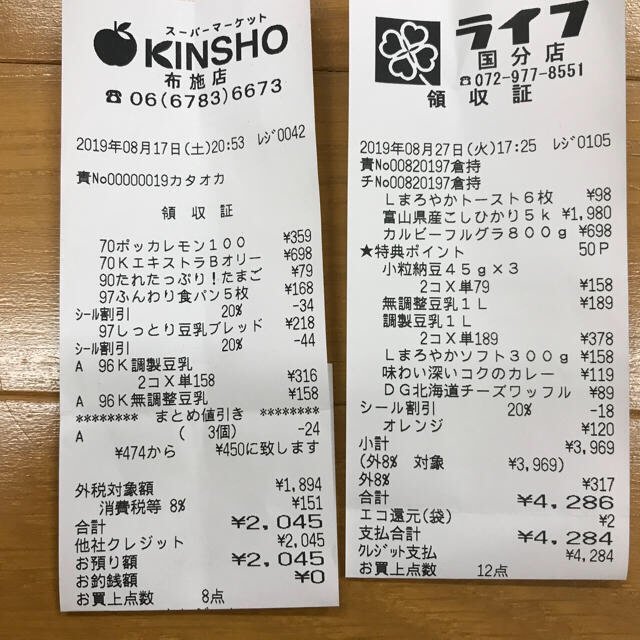
Every value carries a verified on-page location — bbox + 4-point vertices + match_ratio — on a 0–1000 normalized grid (0,0 top-left → 1000,1000 bottom-right), the same shape the live API returns. Hover a field to trace it back to the pixels it came from.
Most OCR APIs return boxes — here's how they differ
Google Cloud Vision, Tesseract, Amazon Textract, and Azure AI Document Intelligence all return geometry with their text. They diverge on the coordinate system, on whether you get structured fields or only raw text + layout, and on what the confidence number means. These are verified facts, not marketing — use them to size the integration work for your stack.
| API | Coordinate system | Structured fields | Per-value confidence |
|---|---|---|---|
| Google Cloud Vision | boundingPoly vertices in pixels of the source image | Text + geometry only (structured key-values are Google Document AI, a separate product) | Recognition confidence per word/symbol (0–1) |
| Tesseract | hOCR / TSV boxes in pixels (self-hosted, no API) | None — raw text + layout | Recognition confidence per word (0–100) |
| Amazon Textract | BoundingBox normalized 0–1 of page width/height (+ Polygon) | Forms/tables via AnalyzeDocument; receipts via AnalyzeExpense | Recognition confidence (%) per block |
| Azure Document Intelligence | Bounding polygon in pixels (images) or inches (PDF) | Prebuilt/custom models | Recognition confidence per word |
| space-ocr | bbox normalized 0–1000 (+ oriented vertices) | Built-in templates + custom fields, with line items | match_ratio — share of the value's characters found on the page — + bbox_source |
Two things to notice. First, coordinate units aren't portable — pixel boxes from Vision/Tesseract/Azure are tied to the exact image you sent, while normalized boxes (Textract, space-ocr) survive a resize. Second, the confidence column means different things: most APIs report a recognition confidence (how sure the model is), which is not the same as measuring how much of a returned value was actually located on the page.
How the box is derived matters as much as its format. With space-ocr, the language model returns each field's text — and a hint of which word tokens it used — but never the boxes themselves. The engine character-matches that text against the symbols the vision OCR actually detected on the page, so the box lands on the real pixels those characters were found at, and each value gets a match_ratio for how much of it was located. The token hints can be noisy (they sometimes swap between repeated rows), so column- and row-consistency checks validate them rather than trusting them blindly. That's the difference between a coordinate the model asserts and one that's checked back against the page.
What space-ocr returns for every value
Alongside each extracted value you get four things, so a coordinate is never just a number you have to trust:
bbox— an axis-aligned rectangle{ xmin, ymin, xmax, ymax }of integers on a 0–1000 normalized grid (0,0 = top-left, 1000,1000 = bottom-right), independent of the image's pixel size.vertices— exactly four ordered points (top-left, top-right, bottom-right, bottom-left) forming an oriented box that follows the document's tilt, so a skewed phone photo still boxes cleanly.match_ratio— the fraction (0–1) of the value's characters that were actually located on the page. A field is treated as a confident match at ≥ 0.85;1.0means every character was found.bbox_source— a label for how the coordinate was derived (e.g.vision_symbol_matchfor the character-matching path,low_confidencewhen the match ratio falls below the threshold).
{
  "total": {
    "value": "2,045",
    "bbox": { "xmin": 381, "ymin": 803, "xmax": 500, "ymax": 825 },
    "vertices": [
      { "x": 380, "y": 804 }, { "x": 500, "y": 801 },
      { "x": 500, "y": 823 }, { "x": 381, "y": 826 }
    ],
    "match_ratio": 1.0,
    "bbox_source": "vision_symbol_match"
  }
}
Pixels or normalized? Convert once, and resizes stop breaking
A recurring OCR-integration bug is that pixel coordinates are tied to the exact image you uploaded — resize or recompress it for storage, or miss an EXIF-rotation flag, and the overlaid boxes drift, crop, or land on the wrong text. Normalized coordinates avoid that whole class of bug: a 0–1000 box maps onto any rendering of the same page.
To draw a box on a displayed image, convert once:
- SVG overlay — give the SVG
viewBox="0 0 1000 1000"and draw thebbox/verticesas-is. - Absolute-positioned div —
leftPct = xmin / 1000 * 100,topPct = ymin / 1000 * 100,widthPct = (xmax - xmin) / 1000 * 100,heightPct = (ymax - ymin) / 1000 * 100. - Back to pixels —
pixel_x = bbox_x / 1000 * image_width,pixel_y = bbox_y / 1000 * image_height.
The engine also applies EXIF orientation on load, so the coordinates it returns already match the image as displayed — a rotated phone photo (orientation 6/8) doesn't need a correction pass on your side.
curl -s https://api.space-ocr.com/ocr/fields \
  -H "Authorization: Bearer $SPACE_OCR_API_KEY" \
  -H "Content-Type: application/json" \
  -d '{
    "image": "https://example.com/receipt.jpg",
    "imageType": "url",
    "fields": [
      { "name": "vendor", "type": "string" },
      { "name": "total",  "type": "string" }
    ]
  }'
A confidence score and a match ratio aren't the same thing
This is the distinction worth internalizing. Most OCR APIs document a recognition confidence — a number that reflects how sure the engine is about its own reading, based on things like font clarity and image quality. It's useful, but it's the model grading its own homework. A match ratio measures something external: of the characters in the value the model returned, how many were actually found among the symbols the page-level OCR detected. A value can be returned with a recognition confidence and still not line up with anything on the page; a low match_ratio catches exactly that. Use it as a gate — sort or filter for match_ratio < 0.85 to surface the handful of values worth a human glance, instead of re-checking everything.
Verify, then query — without re-running OCR
Coordinates are most useful when the data sticks around. Push images into a sheet with POST /upload, then query it server-side with GET /view — where, sort, select, limit, offset — to pull, say, every row where match_ratio is low or total >= 40000, with no re-OCR and no extra charge. Each returned value keeps its bbox/vertices (or drop them with boxes=0 for a lighter payload). For the verification workflow in depth, see validating OCR with bounding boxes and the OCR audit trail.
How to get verifiable bounding boxes from the API
- Request fieldsPOST the image to /ocr/fields with imageType 'url' or 'base64', and either a templateId or your own fields array. The engine takes raster images (JPEG, PNG, GIF, BMP, TIFF, WebP).
- Read the coordinatesEach value returns a bbox { xmin, ymin, xmax, ymax } on a 0–1000 grid, four oriented vertices, a match_ratio, and a bbox_source.
- Overlay or convertDraw boxes with an SVG viewBox '0 0 1000 1000', or convert to pixels with pixel_x = bbox_x / 1000 * image_width. EXIF rotation is already applied, so boxes match the displayed image.
- Gate on the match ratioTreat a match_ratio of 0.85 or above as a confident match; surface anything below for a human glance instead of re-checking every value.
- Store and queryPush images into a sheet with /upload and query it with GET /view (where, sort, select) — coordinates are retained, with no re-OCR and no extra charge.
Which OCR APIs return bounding boxes?
Are the bounding-box coordinates in pixels or normalized?
What's the difference between an OCR confidence score and a match ratio?
Can I get oriented bounding boxes for skewed or rotated photos?
Does the bounding-box OCR work for Japanese, Korean, and Chinese?
Get source coordinates for every value
Free tier — 100 scans a month, no credit card. Every field returns a bounding box, oriented vertices, and a match ratio.