Looking for an Amazon Textract alternative?
A fair, fact-checked look at when to choose an Amazon Textract alternative — verifiable per-value coordinates, CJK (Japanese/Korean/Chinese) support, a queryable sheet, flat pricing, and no AWS setup — proven with a live demo.
Amazon Textract is a capable, mature OCR service, and for an AWS-native pipeline processing English documents at scale it's a sensible default. But "capable" and "the right fit for your job" aren't the same thing, and a few real constraints send people looking for an Amazon Textract alternative:
- No CJK. Textract's printed-text, forms, and tables features cover a set of Latin-script languages (English, French, German, Italian, Portuguese, Spanish); handwriting, invoices/receipts (AnalyzeExpense), IDs (AnalyzeID), and Queries are English-only. Japanese, Korean, and Chinese aren't on the list.
- AWS gravity. Using it means an AWS account, IAM, the SDK, a supported region, and usually S3 — a real setup cost if you just want to send an image and get fields back.
- Feature-stacked, per-page pricing. You pay per page, and the rate depends on which feature you call (plain text vs. forms vs. tables vs. queries vs. expense), with combined features stacking the cost.
- No built-in, value-by-value review UI. Textract returns confidence scores; human-in-the-loop review is a separate service (Amazon Augmented AI / A2I) you wire up yourself.
This guide is a fair comparison — where Textract is strong, and where an alternative like space-ocr fits — and it leads with a live demo you can actually check rather than a feature grid you have to trust.
Proof first: an extraction you can check
The single thing most OCR vendors won't put in front of you is an extraction where every value points back to the exact spot on the page it came from. Hover any field below — the box on the receipt is where that value was read, and each value carries a match ratio for how much of it was actually found on the page.
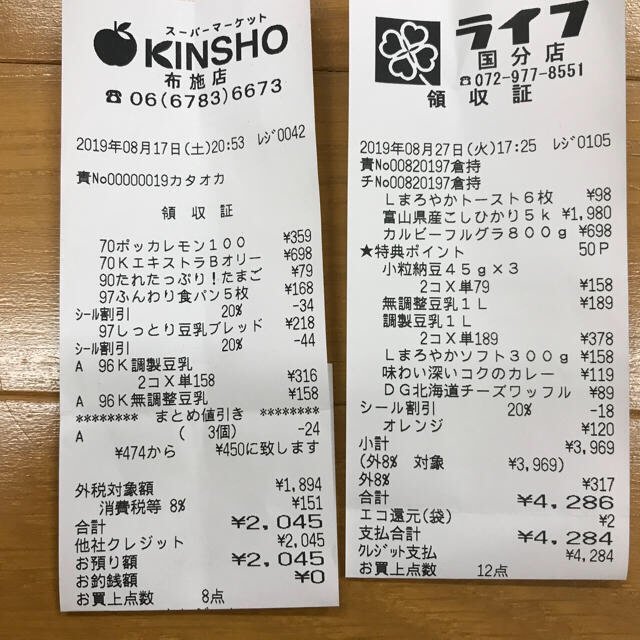
Every value carries a verified on-page location — bbox + 4-point vertices + match_ratio — on a 0–1000 normalized grid (0,0 top-left → 1000,1000 bottom-right), the same shape the live API returns. Hover a field to trace it back to the pixels it came from.
What to compare when evaluating a Textract alternative
Both tools read documents and return structured data with coordinates. The differences are in how you verify a value, which languages are covered, how the data leaves the tool, and what it costs to start. The table states verified facts for each — use it as a checklist for your own workload.
| Capability | Amazon Textract | space-ocr |
|---|---|---|
| Bounding boxes | Yes — a normalized 0–1 BoundingBox plus a Polygon per block | Yes — a 0–1000 normalized bbox plus oriented vertices per value |
| Per-value confidence | A recognition confidence (%) per block | match_ratio — the share of the value's characters actually located on the page — plus a bbox_source label |
| Built-in value-by-value review UI | Not in Textract itself; human review is a separate service (Amazon A2I) | Built into the app — click a cell and its exact region lights up on the original |
| Receipt / invoice fields | AnalyzeExpense (a separate API), English-only | templateId receipt/invoice or your own fields, in any supported language |
| Line items | AnalyzeExpense line items (ITEM / QUANTITY / PRICE) | An array field with children, each cell individually positioned |
| Japanese / Korean / Chinese | Not listed (6 Latin-script languages; Expense/ID/handwriting are English-only) | One engine auto-detects Japanese, Korean, Chinese, English, and more |
| Queryable storage | You store and query results yourself | A stored sheet is queryable server-side via GET /view (where, sort, select) — no re-OCR, no extra charge |
| CSV export | Build it yourself from the JSON | One click — UTF-8 BOM, line items unfolded |
| Pricing model | Per-page, billed per feature; combining features stacks the cost; on top of an AWS account | Flat ¥10 per image (about $0.05); free tier 100 scans/month, no card; Pro $39/month |
| Setup | AWS account + IAM + SDK, regional service, usually S3 | One HTTPS call with a Bearer key; also a Claude Code plugin |
About "verifiable": the coordinates aren't taken on the model's word. The language model returns each field's text — and a hint of which word tokens it used — but never the boxes themselves. The engine then character-matches that text against the symbols the vision OCR actually detected on the page, so a box lands on the real pixels those characters were found at, and each value gets a match_ratio for how much of it was located (a field is treated as confidently matched at ≥ 0.85). The model's token hints can be noisy — it sometimes swaps them between repeated rows — so column- and row-consistency checks validate them instead of trusting them blindly. The point isn't that the AI can't be wrong; it's that every value is checked back against the page, with a score that says how well it matched.
Where Textract is the better choice
A fair comparison names where the incumbent wins. Reach for Textract when:
- You're already deep in AWS and want OCR that drops into S3 → Lambda → Textract with IAM and SNS you already operate.
- Your documents are English / Latin-script and you need forms, tables, and queries at very large scale.
- You want custom adapters trained on your own document types, or AWS-native compliance and data-residency guarantees.
If that's you, Textract is a strong fit and an alternative buys you little.
Where space-ocr fits instead
A Textract alternative earns its place when one or more of these matters:
- You process Japanese, Korean, or Chinese documents. space-ocr runs CJK and Latin scripts through one engine with automatic language detection — no language parameter to set.
- You want to verify, not just trust. Every value returns with its on-page box and a
match_ratio, and clicking a cell highlights exactly where it was read — auditing is built in, not a separate service to wire up. - You don't want to stand up storage. Results land in a sheet you can query server-side (
GET /view) and export to CSV in one click — no database, no AWS account. - You want predictable pricing. A flat ¥10 per image, a free tier of 100 scans a month with no credit card, and a $39/month Pro plan — no per-feature page stacking.
- You build with Claude. There's a two-line Claude Code plugin and a dependency-free Python client.
The whole call is one HTTP request — no SDK, and no PDF preprocessing for the engine (it takes raster images: JPEG, PNG, GIF, BMP, TIFF, WebP).
curl -s https://api.space-ocr.com/ocr/fields \
  -H "Authorization: Bearer $SPACE_OCR_API_KEY" \
  -H "Content-Type: application/json" \
  -d '{
    "image": "https://example.com/invoice.jpg",
    "imageType": "url",
    "templateId": "invoice"
  }'
Each value comes back with a bbox ({ xmin, ymin, xmax, ymax } on a 0–1000 grid), four vertices for an oriented box that follows a tilted phone photo, a match_ratio, and a bbox_source. For the full coordinate model, see an OCR API with bounding boxes; for the async, webhook-driven side, see the invoice data extraction API guide.
Languages: the clearest dividing line
If your documents are Japanese receipts, Korean invoices, or Chinese forms, this is usually the deciding factor. Textract's printed-text, forms, and tables features support six Latin-script languages, and its handwriting, AnalyzeExpense, AnalyzeID, and Queries features are English-only — Japanese, Korean, and Chinese aren't on the supported list. space-ocr normalizes multiple scripts in one engine (full-width and half-width characters, hyphen variants, CJK spacing, vertical Han, mixed scripts), detecting the language automatically with no hint to pass.
Pricing: per-feature pages vs. a flat per-image rate
Textract uses per-page, usage-based pricing where the rate depends on the feature — plain text detection is billed differently from forms, tables, queries, or AnalyzeExpense, and calling several features on one page stacks the cost — all on top of an AWS account. space-ocr is a flat ¥10 per image (about $0.05) regardless of how many fields you pull, with a free tier of 100 scans a month and no credit card, and Pro at $39/month for 1,100 scans, team sharing, and 100 GB of storage. Failed extractions aren't charged, and querying a stored sheet (GET /view) is free.
How to try space-ocr as a Textract alternative
- Get a key — no AWS accountSign up for the free tier (100 scans a month, no credit card) and grab your spocr_ API key. There's no IAM, region, or S3 to configure.
- Send the imagePOST the document to /ocr/fields with imageType 'url' or 'base64'. The engine takes raster images (JPEG, PNG, GIF, BMP, TIFF, WebP); language is detected automatically.
- Use a template or your own fieldsPass templateId 'receipt' or 'invoice' for the common cases, or supply your own fields — including an array field with children for line items.
- Verify each valueRead each value's bbox, vertices, match_ratio, and bbox_source. In the app, click a cell to highlight exactly where it was read; a match_ratio below 0.85 flags a value worth a closer look.
- Query or export — no storage to buildPush images into a sheet with /upload, query it server-side with GET /view (where, sort, select), or download CSV with line items unfolded — no database and no re-OCR charge.
Is there a free Amazon Textract alternative?
Does space-ocr support Japanese, Korean, and Chinese, which Textract doesn't list?
How can I verify what the OCR extracted?
Do I need an AWS account to use space-ocr?
Can space-ocr extract receipt and invoice line items like AnalyzeExpense?
Try a verifiable Textract alternative on your own documents
Free tier — 100 scans a month, no credit card, no AWS account. Every value comes back with its on-page location and a match ratio.