回傳可驗證資料的 OCR API
一次 REST 呼叫回傳結構化 JSON,每個值都帶 box、quad 與一個驗證判定。Bearer 認證、fields 宣告或 autoFields、非同步工作、簽章 Webhook。
大多數 OCR API 只給你一整頁文字和一個全頁的信賴度數字。你還得自己去找發票合計、解析它、再祈禱它落到了正確的位置。space-ocr 的 OCR API 替你完成結構化:用一張圖片和一份欄位宣告做一次 POST(想讓 API 自己提出 schema 就打開 autoFields),就拿回具名值的 JSON。
在生產裡真正起作用的,是每個值附帶了什麼。data.cells 用與你宣告的 schema 相同的路徑索引,裡面有這個值被讀取的框、框的四個角、verified 判定,以及支撐這個判定的理由。所以你的管線不必信模型的一面之詞,而是可以把每個值和它在文件上的實際位置對照核驗,再依 data.review.flagged 逐條處理沒有對上的值。
一份你可以親自查看的真實回應
把滑鼠移到下方任一欄位上——發票上的框就是這個值被讀取的位置。這是一份真實的解析結果:開立名稱 ソジュハンザン海物語様、應付金額 ¥84,263、合計 ¥46,752、每一條明細列,全都連同各自的框與核對依據回傳。這裡沒有任何東西是擺拍的。
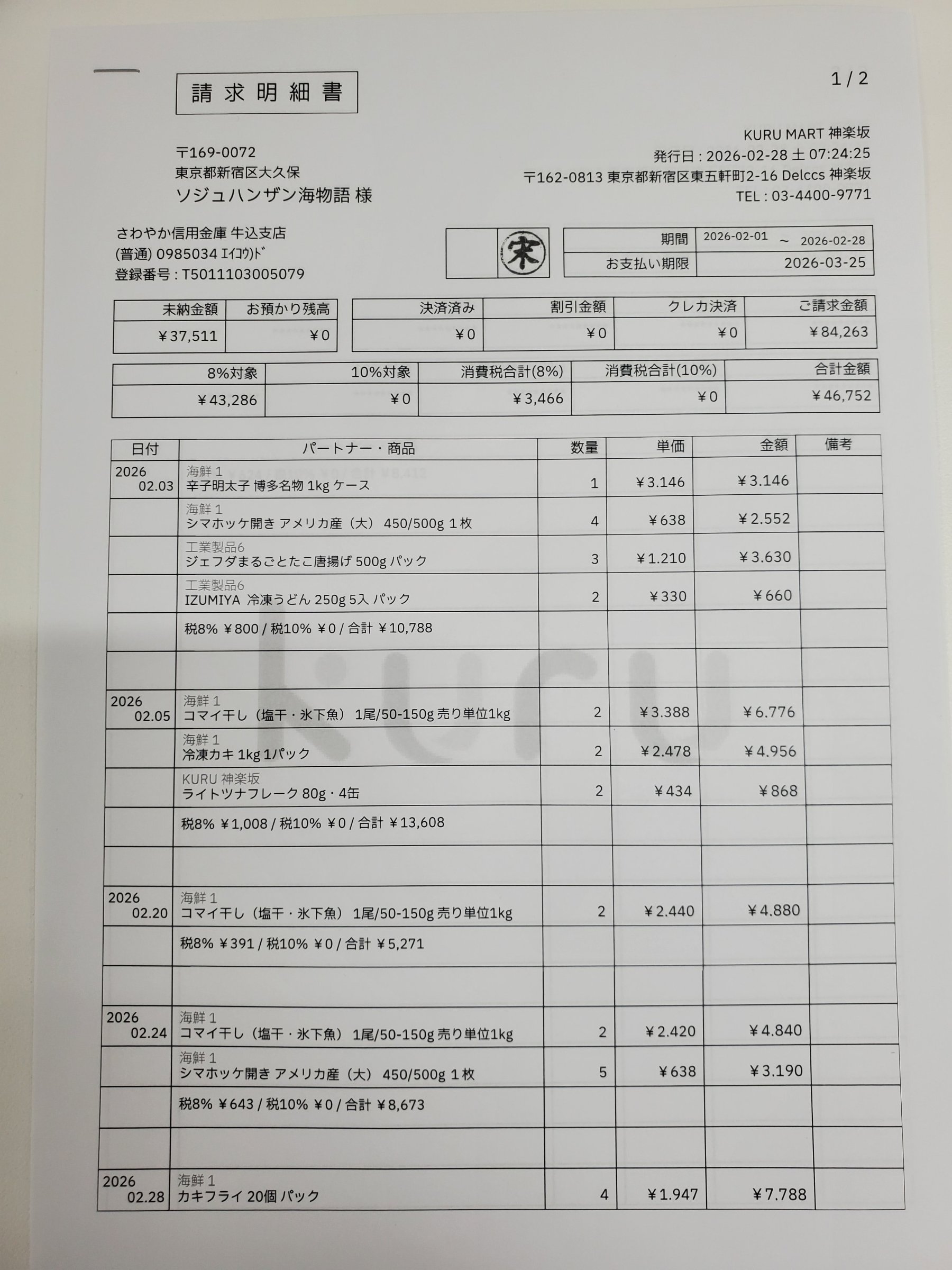
Each value with a box carries a verified on-page location — in data.cells[path], that is box + 4-point quad + evidence.match_ratio — on a 0–1000 normalized grid (0,0 top-left → 1000,1000 bottom-right), the same shape the live API returns. Hover a field to trace it back to the pixels it came from.
space-ocr 裡的 OCR API 如何運作
用 Bearer 權杖認證——你的金鑰以 spocr_ 開頭,基底位址是 https://api.space-ocr.com。把一張點陣圖片以 URL 或 base64 送到 POST /ocr/fields(公開 API 接收圖片——JPEG、PNG、GIF、BMP、TIFF、WebP——所以遇到 PDF 就送頁面圖片)。宣告你自己的 fields,或者打開 autoFields 讓 API 提出 schema,就拿回 { status: 'success', data: { values, cells, review, image } }。
座標不是模型編出來的。幾何資訊只有一個來源,就是 OCR 那一遍;模型只給出值,隨後字元比對器把每個值與頁面上實際偵測到的符號對齊。對齊的結果落在 data.cells[path] 裡:表示位置的 box 與 quad、作為判定的 verified、對不上時帶理由的 review,以及 text_match、match_ratio、printed_text 這些 evidence。座標是值來源的依據,不是它正確的證明——兩個引擎也可能在同一處誤讀上達成一致,所以業務層面的校驗請保留。所有座標都正規化到 0–1000,換算成像素要用 data.image 的 width 與 height。每個回應還帶一個 X-Request-Id 標頭,錯誤以 { error: { code, message, requestId } } 回傳。
curl -s https://api.space-ocr.com/ocr/fields \
  -H "Authorization: Bearer $SPACE_OCR_API_KEY" \
  -H "Content-Type: application/json" \
  -d '{
    "image": "https://example.com/invoice.png",
    "imageType": "url",
    "fields": [
      { "name": "vendor", "type": "string", "required": true },
      { "name": "invoice_date", "type": "date", "required": true },
      { "name": "total", "type": "number", "required": true, "min": 0 },
      { "name": "items", "type": "array", "children": [
        { "name": "description", "type": "string" },
        { "name": "amount", "type": "number" }
      ] }
    ]
}'import os, requests
resp = requests.post(
"https://api.space-ocr.com/ocr/fields",
headers={"Authorization": f"Bearer {os.environ['SPACE_OCR_API_KEY']}"},
json={
"image": "https://example.com/invoice.png",
"imageType": "url",
"fields": [
{"name": "vendor", "type": "string", "required": True},
{"name": "invoice_date", "type": "date", "required": True},
{"name": "total", "type": "number", "required": True, "min": 0},
],
},
timeout=60,
)
resp.raise_for_status()
data = resp.json()["data"]
print(data["values"]) # business data, in the schema you declared
print(data.get("normalized")) # deterministic parse of the declared date and number
for item in data["review"]["flagged"]:
cell = data["cells"].get(item["path"]) # a missing or nobox flag has no cell
print(item["path"], item["reasons"], cell["box"] if cell else None)如何呼叫 OCR API
- 取得 API 金鑰登入並建立一個金鑰——它以 spocr_ 開頭。向 https://api.space-ocr.com 的每次請求都以 Authorization: Bearer <key> 傳送。
- 傳送圖片向 POST /ocr/fields 傳送 image(一個 URL 或純 base64)與 imageType。PDF 請送頁面圖片——API 接收點陣格式(JPEG、PNG、GIF、BMP、TIFF、WebP)。
- 宣告欄位在 fields 裡為每個值寫上名稱與型別,需要規則的地方補上 required、pattern、min/max、enum、label 或 near;明細列表格用帶 children 的 array 欄位。想讓 API 自己提出 schema,就改用 autoFields。
- 讀取結構化結果你會拿到 { status: 'success', data: { values, cells, review, image } }。values 是業務資料,cells[path] 裝著它的 box、quad、verified 判定與 evidence,review.flagged 列出帶理由的待複核路徑。
- 擴展與查詢用 POST /upload 把許多圖片排入佇列(按檔案回傳工作,簽章 Webhook 或 GET /jobs/{jobId}),再用 GET /view 搭配 where、sort、select 讀取已儲存的工作表——無需重跑 OCR,也不額外收費。
簡單、可預期的定價
每張圖片 $0.05(¥10 / ₩100),含每月 100 點數的免費額度,免信用卡。用 GET /view 重新讀取已儲存的工作表不會重跑 OCR,也不收費。方案計畫增加每月點數、更多工作表與儲存空間。