Japanese OCR that returns data you can check
Read Japanese receipts, invoices, and delivery notes with space-ocr: mixed scripts, full-width and vertical text, CJK-safe CSV, every value located with a box and a review list of what to check.
Japanese is where ordinary OCR quietly falls apart. A single receipt mixes kanji, kana, half-width katakana, full-width digits, and a stray run of English, and the totals might sit in a vertical column down the right edge. Most tools either force you to pick a language first or hand back a flat blob of text that loses the layout. Japanese OCR that actually helps has to read all of that at once and tell you where each number came from.
space-ocr does both. It reads JP documents and returns structured fields in data.values, and it returns every value with the exact spot on the page it was read from — data.cells[path] carries a box, a quad, the verdict, and the evidence behind it. Whatever did not check out comes back as a work list in data.review.flagged, so you look at a short queue instead of re-reading the page. There is no language setting to choose; one engine handles Japanese, Korean, Chinese, and English together.
See a real Japanese extraction you can check
Hover any field below. The two receipts read here are real — a KINSHO 布施店 slip totalling 2,045 and a ライフ 国分店 slip totalling 4,286, both dated August 2019. Every value and box comes straight from a parsed result, not a mockup, and the boxes follow each line of mixed kanji-kana-digit text. The character-match figure beside a row is supporting evidence, not a pass mark.
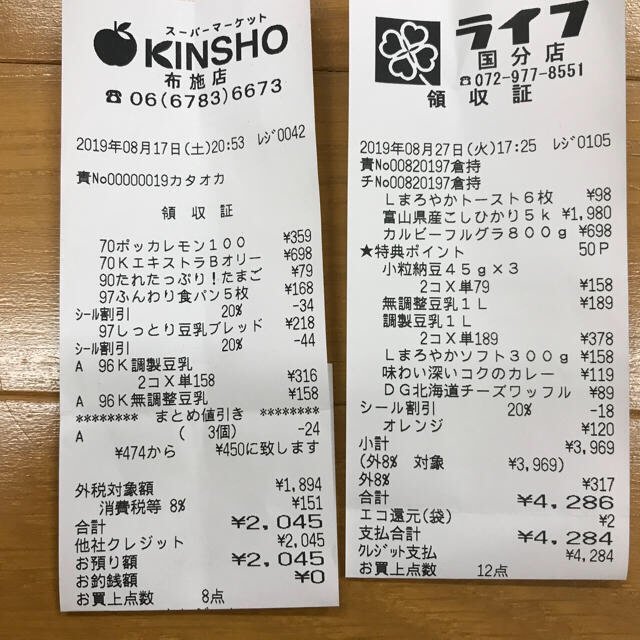
Each value with a box carries a verified on-page location — in data.cells[path], that is box + 4-point quad + evidence.match_ratio — on a 0–1000 normalized grid (0,0 top-left → 1000,1000 bottom-right), the same shape the live API returns. Hover a field to trace it back to the pixels it came from.
How Japanese OCR works in space-ocr
The model never produces coordinates. It reads the document and returns the values; a character matcher then compares those characters against the symbols the OCR pass actually detected on the page, and that comparison produces the box, the quad, and the evidence stored beside each cell. verified is the verdict that mirrors review: false when any reason is attached, true when a check ran and nothing was flagged, null when there was nothing to check. The character comparison itself is evidence.text_match, and evidence.match_ratio reports character coverage as supporting evidence rather than a pass mark. Two engines can still agree on the same misread, so read the queue as what to look at first, not as a guarantee.
Drop a PDF into the app and each page is rendered to an image first, then read — handy for multi-page invoices and delivery notes. Calling the API directly, send raster page images by URL or base64 and the structured result is the same. Declare the fields you want, or send autoFields: true and let the response propose them; an array field with children describes one line-item row, addressed as items[0].amount.
Declarations are checked after extraction and never reach the model, so they change the review signal rather than the reading. type: "date" adds a deterministic data.normalized leaf — 令和8年8月16日 parses to 2026-08-16 while data.values keeps what is printed — and type: "number" turns ¥13,220 into 13220. pattern runs against the width-folded value, so ^T[0-9]{13}$ still matches a registration number printed in full width. For the party mix-up that JP forms invite, declare 御中 or 様 as near vocabulary for the addressee and 登録番号 / TEL / 〒 as not_near: a wrong pick then surfaces as near_mismatch or near_conflict instead of passing quietly. Leave a column that legitimately prints 一式 or 翌月末払い as a string — declaring a type there puts a correct document in the review list on every run.
curl -s https://api.space-ocr.com/ocr/fields \
  -H "Authorization: Bearer $SPACE_OCR_API_KEY" \
  -H "Content-Type: application/json" \
  -d '{
    "image": "https://example.com/invoice-jp.jpg",
    "imageType": "url",
    "fields": [
      { "name": "issuer", "type": "string", "required": true,
        "near": ["登録番号", "TEL", "〒"] },
      { "name": "bill_to", "type": "string",
        "near": { "terms": ["御中", "様"], "match": "suffix" },
        "not_near": ["登録番号", "TEL"] },
      { "name": "registration_no", "type": "string", "pattern": "^T[0-9]{13}$" },
      { "name": "issue_date", "type": "date", "required": true },
      { "name": "total", "type": "number", "required": true, "min": 0 },
      { "name": "items", "type": "array", "children": [
        { "name": "name", "type": "string" },
        { "name": "qty", "type": "string" },
        { "name": "amount", "type": "number" }
      ] }
    ]
  }'
How to OCR a Japanese document
- Add your documentIn the app, drop a receipt, invoice, or PDF — each page is rendered to an image and queued for OCR. Calling the API, send raster page images (url or base64) to /ocr/fields. There is no language setting.
- Declare your fieldsList the fields you need, or send autoFields: true and let the response propose a schema. Use an array field with children for line-item tables, and add type, pattern, near, or not_near where the document supports the rule.
- Read the structured resultBusiness data stays in data.values. data.cells[path] carries box, quad, verified, review, and evidence; data.image is the frame those coordinates are measured against; data.normalized holds the parsed dates and numbers for declared scalar fields.
- Work the review queueIterate data.review.flagged. Each entry has a path and a rank-ordered reasons array whose first item is the primary one, and flagged.length is how many values need attention. Open the matching cell to highlight the region the value was read from.
- Export or queryDownload CSV (UTF-8 BOM so Japanese opens cleanly, line items unfolded), or read a stored sheet with GET /view using where, sort, and select — reading stored rows runs no new OCR and GET /view is not charged.
Simple, predictable pricing
One credit is one page: $0.05, tax included, with 100 credits free every month and no credit card. Failed scans are never charged. Flat plans add monthly credits, more sheets, and storage.
Do I have to tell it the document is in Japanese?
Does it handle full-width characters and vertical text?
Will Japanese text survive the CSV export, or turn into mojibake?
Does Japanese OCR keep the location of each value?
Which Japanese documents can it read?
How much does Japanese OCR cost?
Turn your own Japanese documents into checkable data
Free tier — 100 credits a month, no credit card. Every value comes back with its on-page location.