Invoice OCR that turns supplier bills into data you can trust
Invoice OCR that reads supplier, invoice number, dates, totals and every line item into the fields you declare — each value with its box and quad coordinates, a verified verdict, and a review list of what to check.
Every invoice that lands in your inbox is a small data-entry tax. Someone opens the PDF, finds the supplier, the invoice number, the dates, the tax line, the total, then retypes it all into the accounting system — and copies the line items by hand if anyone needs them. It's slow, it's where the typos live, and a single fat-fingered total can hold up a payment run.
Invoice OCR is supposed to take that off your plate: read the bill, get the fields back. The problem with most tools is they hand you a number and ask you to trust it. space-ocr reads the invoice into the fields you declare and returns each value with the region of the page it was read from, together with a review list naming the values that did not check out. Before you approve a payment you look at those few figures instead of re-reading the whole page.
See a real invoice you can check
Hover any field below — the box on the invoice is where that value was read. The supplier, the issue date, the billing period, the due date, the billed amount, the running total, and each line item are all read straight from a real parsed result, not a mockup.
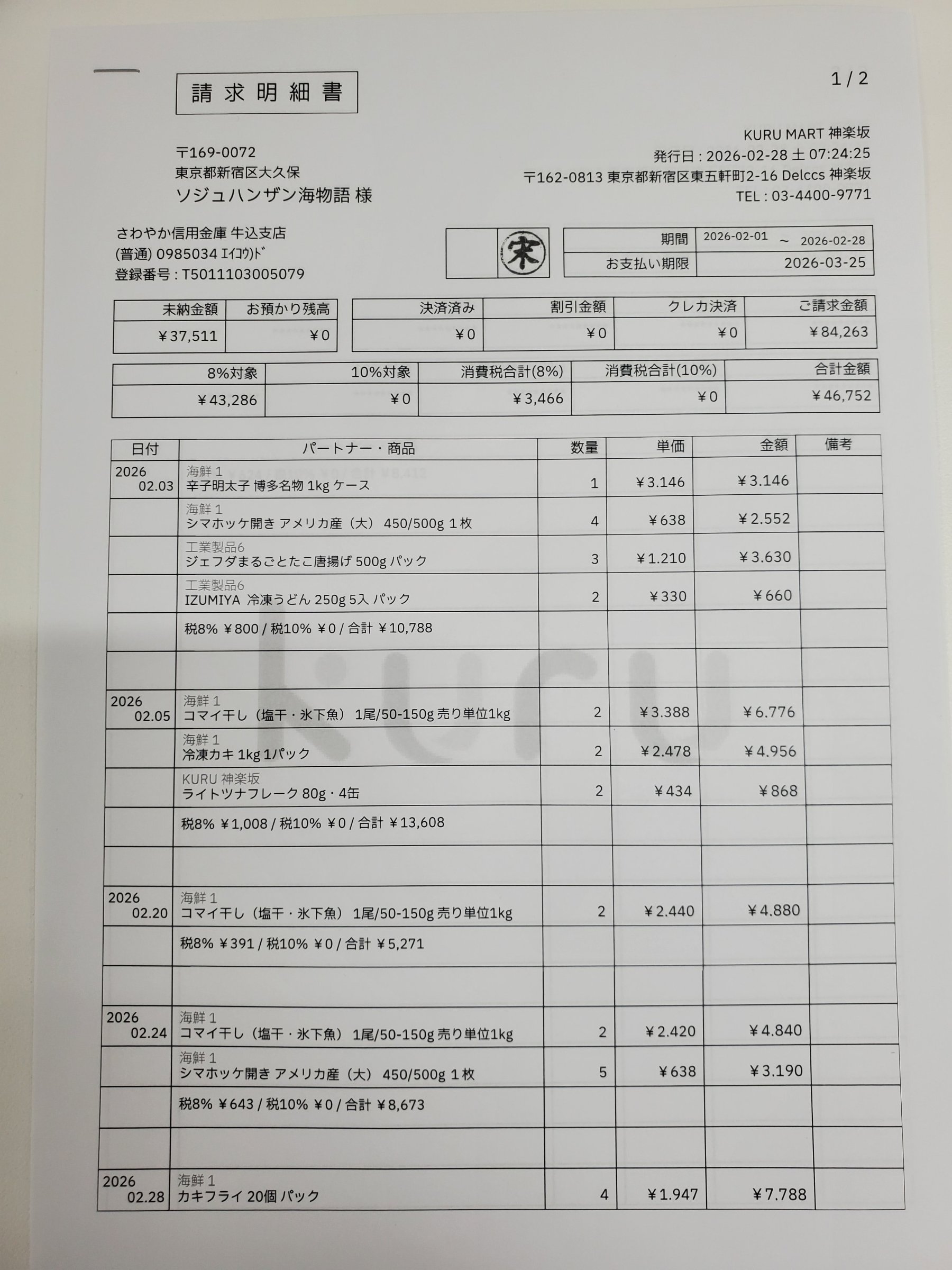
Each value with a box carries a verified on-page location — in data.cells[path], that is box + 4-point quad + evidence.match_ratio — on a 0–1000 normalized grid (0,0 top-left → 1000,1000 bottom-right), the same shape the live API returns. Hover a field to trace it back to the pixels it came from.
How invoice OCR works in space-ocr
Drop an invoice into the app and it's read into a row: supplier, dates, amounts, and the line items as a sub-table you can sort, filter and export. A PDF invoice is rendered to an image per page first, then read. If you're calling the API directly, send the page image (the public API takes raster images — JPEG, PNG, GIF, BMP, TIFF, WebP) and you get the same structured result back.
You don't describe an invoice from scratch, and there is no template to choose. Send fields — the names your ledger already uses, each with the checks that fit an invoice — or send autoFields on an unfamiliar layout and keep the names that come back as your declaration. Line items are a single array field whose children describe one row.
What comes back for each invoice:
data.values— the business data, in exactly the shape you declared.data.cells[path]—boxandquadfor that value, plusverified,reviewandevidence(the character cross-check detail, includingtext_match,printed_textandmatch_ratio).data.review.flagged— the work list: each entry is apathand itsreasons, ranked, with index 0 as the primary one.data.normalized— the parsed number or ISO date for every field you gave a scalar type.data.image— the width and height every coordinate is measured against.
curl -s https://api.space-ocr.com/ocr/fields \
  -H "Authorization: Bearer $SPACE_OCR_API_KEY" \
  -H "Content-Type: application/json" \
  -d '{
    "image": "https://example.com/invoice-page-1.png",
    "imageType": "url",
    "fields": [
      { "name": "supplier", "type": "string", "required": true, "not_near": ["Bill To", "御中"] },
      { "name": "bill_to", "type": "string", "near": ["Bill To", "御中"] },
      { "name": "invoice_no", "type": "string", "required": true, "pattern": "^[A-Za-z0-9-]{4,}$" },
      { "name": "issue_date", "type": "date", "required": true },
      { "name": "due_date", "type": "date" },
      { "name": "subtotal", "type": "number", "min": 0 },
      { "name": "tax", "type": "number", "min": 0 },
      { "name": "total", "type": "number", "required": true, "min": 0 },
      {
        "name": "items", "type": "array",
        "children": [
          { "name": "description", "type": "string" },
          { "name": "quantity", "type": "number" },
          { "name": "unit_price", "type": "number" },
          { "name": "amount", "type": "number" }
        ]
      }
    ]
  }'
How to OCR an invoice
- Add the invoiceIn the app, drop the invoice (PDF or image) — each page is rendered to an image and queued for OCR. For AP automation, post it to /upload and get a webhook when it's read.
- Declare the fieldsSend fields with the names your ledger uses and the checks that fit an invoice — required on the invoice number, type date on the dates, type number with min on the amounts — or send autoFields on an unfamiliar layout and keep the names that come back. Line items are one array field with children.
- Read the structured resultBusiness data is in data.values. Coordinates and the per-value verdict are in data.cells[path] — box, quad, verified, review, evidence — and data.image gives the frame those coordinates are measured in.
- Verify before you postIterate data.review.flagged instead of thresholding a score. Each entry names a path and its reasons; jump to data.cells[path], highlight the box or quad on the page and correct the value. Edits are stored beside the original OCR value.
- Export or queryDownload CSV (UTF-8 BOM, line items unfolded) for your accounting import, or query a stored sheet with GET /view using where, sort and select — no re-OCR, no extra charge.
Simple, predictable pricing
One page read is one credit — $0.05, tax included, the same price in the app or over the API. Every account gets 100 credits a month with no card, and failed scans are never charged. Flat plans add monthly credits, more sheets and storage.
What does invoice OCR pull off an invoice?
Can it read the line items, not just the total?
How do I know the total it read is right?
Can I export invoices to CSV or feed them into accounting?
Does it handle PDF invoices?
How much does invoice OCR cost?
Turn your supplier invoices into checkable data
Free tier — 100 credits a month, no credit card. Every value comes back with its on-page location.