Image OCR that returns structured fields, not a wall of text
Run OCR on JPEG, PNG, and other images with space-ocr: declare the fields you need and every value comes back with its box and quad coordinates, plus a data.review.flagged list of what to check.
Most image OCR hands you a wall of plain text and stops there. You snap a receipt, run it, and get back a blob of lines you still have to read, split, and retype into the right columns. The structure that was obvious to your eye on the page is gone.
space-ocr reads an image into structured fields instead — store name here, date there, total over there, line items as rows. Every value also carries the exact spot on the image it was read from: an axis-aligned box and a four-point quad under data.cells[path]. And when a value does not hold up against the page, it shows up in data.review.flagged with its reasons — so what you get back is a work list, not a number you have to take on faith.
See a real extraction you can check
This is one image — a photo of two receipts — read into fields. Hover any value below and the box on the image is exactly where it was read. The values, boxes, and character-match figures shown here come straight from a real parsed result, not a mockup. The match figure is supporting evidence about how much of the value was located on the page, not a pass/fail score.
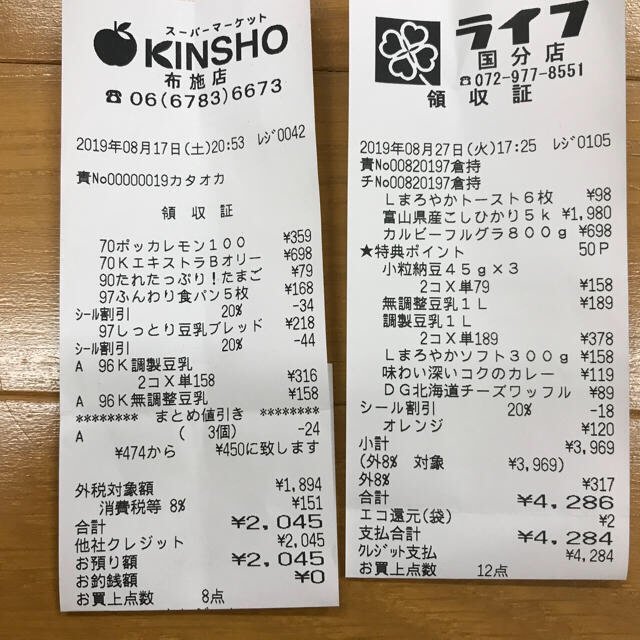
Each value with a box carries a verified on-page location — in data.cells[path], that is box + 4-point quad + evidence.match_ratio — on a 0–1000 normalized grid (0,0 top-left → 1000,1000 bottom-right), the same shape the live API returns. Hover a field to trace it back to the pixels it came from.
How image OCR works in space-ocr
Send an image to /ocr/fields as a URL or as plain base64 — JPEG, PNG, GIF, BMP, TIFF, and WebP are all read directly. EXIF orientation is applied before reading, and a very large photo may be downscaled to 4000px on the longest side, so data.image describes the page the coordinates actually belong to.
You describe the result you want with a fields array: a name and a type (string, number, integer, date, array, object) per field, an array field with children for a line-item table, and optional declarations such as required, pattern, min/max, or enum. If you would rather start from the document, send autoFields: true and work from the field names that come back. Declarations are not shown to the model, so they do not steer the reading — they decide what lands in data.review.flagged and what the deterministic data.normalized layer parses. (PDFs go through the web app, which renders each page to an image first; the API itself reads images.)
curl -s https://api.space-ocr.com/ocr/fields \
  -H "Authorization: Bearer $SPACE_OCR_API_KEY" \
  -H "Content-Type: application/json" \
  -d '{
    "image": "https://example.com/receipt-photo.jpg",
    "imageType": "url",
    "fields": [
      { "name": "store_name", "type": "string", "required": true },
      { "name": "date", "type": "date", "required": true },
      { "name": "total", "type": "number", "required": true, "min": 0 },
      {
        "name": "items",
        "type": "array",
        "children": [
          { "name": "name", "type": "string" },
          { "name": "price", "type": "number" }
        ]
      }
    ]
  }'
How to OCR an image
- Send your imagePost a JPEG, PNG, GIF, BMP, TIFF, or WebP to /ocr/fields as a URL or plain base64, or drop it into the app. EXIF orientation is applied before the page is read.
- Declare your fieldsSend a fields array with a name and type per value — an array field with children for line-item tables — or set autoFields to true and start from the field names that come back.
- Read the structured resultBusiness data stays in data.values. data.cells maps each path to its box and quad, a verified verdict and evidence, and data.image is the frame that converts those coordinates to pixels.
- Work the review listIterate data.review.flagged: each entry names a path and its reasons. Open cells[path], draw the box on the image, and compare the value with what is printed there. Edits are stored beside the original OCR value.
- Export or queryDownload CSV (UTF-8 BOM, line items unfolded), or query a stored sheet with GET /view using where, sort, and select — reading stored rows does not re-run OCR and is not charged.
Simple, predictable pricing
$0.05 per image (tax included), with 100 credits free every month and no credit card. Failed scans are never charged. Flat plans add monthly credits, more sheets, and storage.
What image formats can space-ocr OCR?
Does image OCR give me structured fields or just text?
Can I OCR a photo taken on my phone?
Does image OCR keep the location of each value?
How do I know which values need checking?
How do I send the image to the API?
How much does image OCR cost?
Turn your own images into checkable data
Free tier — 100 credits a month, no credit card. Every value comes back with its on-image location.