The best OCR software for receipts and invoices
A buyer's guide to the best OCR software for receipts and invoices: verifiable accuracy, line items, export, API, webhooks, audit trail, and transparent pricing — proven with a live demo.
Every business that handles paper handles receipts and invoices — and both are miserable to type in by hand. The promise of OCR is obvious: photograph the document, get structured data, move on. The problem is that most OCR tools stop at plausible. They hand you a vendor name and a total and leave you to trust them. For a personal expense log that is fine. For accounts payable, expense reconciliation, or anything that gets audited, "the model said so" is not an answer you can stand behind.
This guide is a buyer's checklist. It walks through what actually separates the best OCR software for receipts and invoices from a flashy demo — verifiable accuracy, line-item extraction, clean exports, a real API with webhooks, an audit trail, and pricing you can predict — and then shows how space-ocr delivers each one, with a live, checkable demo rather than a screenshot.
Proof first: see a real extraction you can check
Before any feature list, here is the thing most vendors won't show you: an extraction where every value points back to the exact spot on the page it came from. Hover any field below — the box on the receipt is where that value was read.
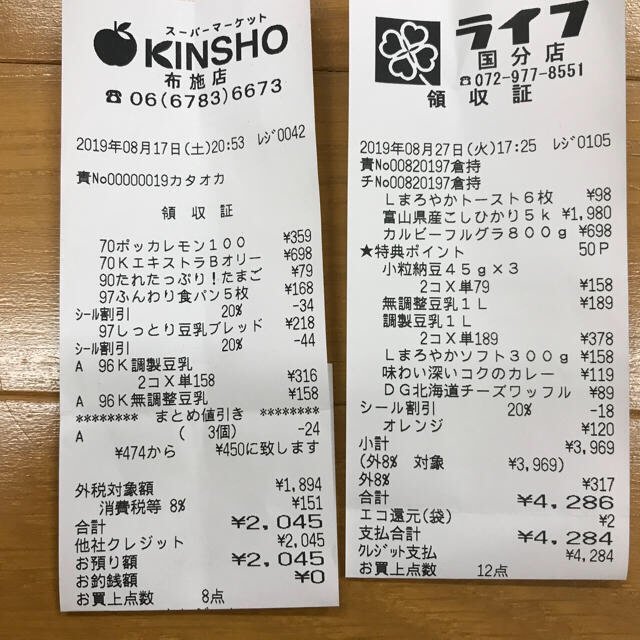
Each value with a box carries a verified on-page location — in data.cells[path], that is box + 4-point quad + evidence.match_ratio — on a 0–1000 normalized grid (0,0 top-left → 1000,1000 bottom-right), the same shape the live API returns. Hover a field to trace it back to the pixels it came from.
What to look for in receipt and invoice OCR
Receipts and invoices are the hardest "easy" documents. Layouts vary by vendor, totals hide among subtotals and tax lines, line items wrap, and a phone photo arrives tilted and glare-streaked. A tool that nails one clean PDF can fall apart on the next crumpled thermal receipt. Use these criteria to cut through the marketing.
| What matters | Why it matters | Weak tool | Strong tool |
|---|---|---|---|
| Verifiable accuracy | A number you can't trace is a number you have to re-key anyway | Returns a value, maybe a confidence score | Returns each value with its source coordinates — an axis-aligned box and a quad that follows the page's tilt |
| A review list, not just a score | Someone has to decide what gets checked first | Leaves you to invent a threshold | Returns the paths that need review with machine-readable reasons, plus a deterministic parse of declared numbers and dates |
| Line items | Invoices and receipts are tables, not flat fields | Grabs the total, drops the rows | Extracts repeating line-item rows with per-cell positions |
| Export | Data has to leave the tool to be useful | Copy-paste or locked-in viewer | CSV (Excel/CJK-safe) and JSON over an API |
| API + webhooks | Real volume means automation, not clicking | UI-only, or a thin sync endpoint | REST API with async jobs and signed webhooks |
| Audit trail | Reviewers need to see what changed | Overwrites OCR output silently | Keeps the original value beside human edits |
| Transparent pricing | Budgeting hates surprises | "Contact us" for everything | A published per-image price and a free tier |
The rest of this article takes each row in turn.
Verifiable accuracy beats a confidence score
A confidence score tells you the model feels sure. It doesn't tell you whether total: 2,045 is the number actually printed on the receipt. space-ocr answers a stricter question. The business data comes back in data.values, and every path into it — total, line_items[0].unit_price — addresses an entry in data.cells:
box— an axis-aligned rectangle{ xmin, ymin, xmax, ymax }on a 0–1000 normalized grid (0,0 = top-left, 1000,1000 = bottom-right).data.imagecarries the width and height of the page as it was read, and that is what converts those numbers to pixels.quad— four ordered points that follow the document's tilt, always returned alongsidebox. Nothing is deskewed, so a skewed phone photo still boxes cleanly against the page as it was read.verified— the verdict:falsewhen the cell carries review reasons,truewhen a check ran and nothing was raised,nullwhen there was nothing to check (a line-item row's union box, for instance).review— eithernullor{ reasons }, naming why the cell wants a second look.evidence— the supporting detail behind the verdict:text_matchfor the character cross-check itself,match_ratiofor how much of the value was located on the page,printed_textfor the raw glyphs read at those coordinates.
The work list is data.review.flagged — an array of { path, reasons } whose paths use the same grammar as the cells keys, so a flagged item is a direct lookup. Because the location travels with the value, you can render the box, cite the coordinates, or re-check a flagged field without re-running OCR. That's the foundation of the OCR audit trail — and it's why the demo above isn't a mockup.
The coordinates aren't taken on the model's word. The language model returns each field's text — and a hint of which word tokens it used — but never the boxes themselves. The engine then character-matches that text against the symbols the vision OCR actually detected on the page, so a box lands on the real pixels those characters were found at, and each value gets a match_ratio for how much of it was located. The model's token hints can be noisy (it sometimes swaps them between repeated rows), so column- and row-consistency checks validate them instead of trusting them blindly. The point isn't that the AI can't be wrong — it's that every value is checked back against the receipt, with a score that says how well it matched.
Line items, not just totals
The single biggest gap in cheap receipt OCR is the table. Anyone can grab a grand total; the value is in the rows — each product, quantity, unit price, and discount. space-ocr extracts these as repeating rows, and every cell keeps its own position, so a wrapped or merged line item is still traceable.
You request them with a field of type: "array" whose children describe one row. For deeper coverage of the row model, see extracting line items from invoices.
{
  "fields": [
    { "name": "vendor", "type": "string" },
    { "name": "invoice_date", "type": "string" },
    { "name": "total", "type": "string" },
    {
      "name": "line_items",
      "type": "array",
      "children": [
        { "name": "description", "type": "string" },
        { "name": "quantity", "type": "number" },
        { "name": "unit_price", "type": "number" }
      ]
    }
  ]
}
Declare the fields you need — or let autoFields propose them
You pass the extraction schema as a fields array: the items your database actually stores, each with a name and a type, and line items as a type: "array" field whose children describe one row. When you don't yet know what a document carries, send autoFields: true instead and the model proposes a schema — copy the names it returns into a fixed declaration and you have your production call.
Declarations are not an accuracy dial. required, pattern, min/max, enum, near and not_near are never shown to the model, so the extracted value is the same either way. What they add is two things: a rule that is broken puts the value in data.review.flagged with a reason (missing, pattern_mismatch, out_of_range, near_mismatch, near_conflict), and declaring number, integer or date adds data.normalized beside values — the same reading parsed deterministically, so the same page yields the same number every run. near and not_near don't make the model pick the right company name off an invoice that prints two of them; they make a wrong pick visible.
The whole call is one HTTP request — no SDK, no PDF preprocessing (the engine reads raster images: photos and scans).
# A. Production — declare exactly what your system stores
curl -s https://api.space-ocr.com/ocr/fields \
  -H "Authorization: Bearer $SPACE_OCR_API_KEY" \
  -H "Content-Type: application/json" \
  -d '{
    "image": "https://example.com/invoice.jpg",
    "imageType": "url",
    "fields": [
      { "name": "issuer",         "type": "string", "near": ["Tax ID", "Tel"] },
      { "name": "recipient",      "type": "string", "not_near": ["Tax ID", "Tel"] },
      { "name": "invoice_no",     "type": "string", "required": true,
        "pattern": "^[A-Z0-9-]{4,}$" },
      { "name": "invoice_date",   "type": "date" },
      { "name": "payment_method", "type": "string", "enum": ["cash", "credit card", "bank transfer"] },
      { "name": "total",          "type": "number", "required": true, "min": 0 },
      {
        "name": "line_items",
        "type": "array",
        "children": [
          { "name": "description", "type": "string" },
          { "name": "quantity",    "type": "number" },
          { "name": "unit_price",  "type": "number" }
        ]
      }
    ]
  }'

# B. Exploring — no schema yet, let the API propose one
curl -s https://api.space-ocr.com/ocr/fields \
  -H "Authorization: Bearer $SPACE_OCR_API_KEY" \
  -H "Content-Type: application/json" \
  -d '{
    "image": "https://example.com/invoice.jpg",
    "imageType": "url",
    "autoFields": true
  }'
Export and the API: where the data goes
Extraction is worthless if the data is trapped. space-ocr gives you two clean exits:
- CSV — sheets export with a UTF-8 BOM so Excel opens Japanese, Korean, and Chinese text correctly. Array (line-item) rows unfold into sub-rows, and any manual correction overrides the OCR value in the output.
- JSON over REST —
POST /ocr/fieldsfor a single document,POST /uploadto push images straight into a sheet, andGET /viewto query a stored sheet server-side (where,sort,select,limit) without re-running OCR or paying again.
For automation at volume, /upload is async by default: it returns a job per file and notifies you on completion via webhooks — one signed (HMAC-SHA256) endpoint per space, with events like ocr.completed and ocr.failed. That's the difference between a tool you click and a pipeline that runs itself. The full surface is in the invoice data extraction API guide and the API docs.
Audit trail: what the machine read vs. what a human changed
The best receipt and invoice OCR doesn't just record its own output — it records corrections. When you edit a cell in space-ocr, your value is stored separately from the original OCR value, and an Original tooltip always shows what the engine first read. A reviewer sees the machine value and the human override side by side, which is exactly what an audit asks for.
Transparent, predictable pricing
Verifiable accuracy and an honest price tend to come from the same place. space-ocr is $0.05 per image. There's a free tier of 100 credits a month with no credit card, and Pro at $39/month includes 1,100 credits, unlimited sheets, and 100 GB of storage. No per-field charges, no per-page surcharge, and queries against a stored sheet (GET /view) are free.
How to extract a receipt or invoice
- Send the imagePOST the receipt or invoice to /ocr/fields with imageType 'url' or 'base64'. The engine reads raster images — a phone photo or a scan.
- Declare the fieldsPass a fields array naming what you store, with line items as an array field whose children describe one row. If the schema isn't settled yet, send autoFields instead and let the model propose one.
- Read the structured resultdata.values holds the business data, data.cells[path] holds box, quad, verified, review and evidence for each value, and data.image gives the page size those coordinates are measured against.
- Verify and correctWork through data.review.flagged: each item names a path and its reasons (text_mismatch, missing, out_of_range, and so on). Click the cell to highlight the exact region it was read from; edits are stored beside the original value.
- Export or queryDownload CSV (UTF-8 BOM, line items unfolded) or query a stored sheet with GET /view using where, sort, and select — no re-OCR, no extra charge.
What is the best OCR software for receipts and invoices?
Can OCR extract line items from a receipt or invoice, not just the total?
Does receipt and invoice OCR work on phone photos?
How much does receipt and invoice OCR cost?
Can I automate receipt and invoice processing at volume?
Try the best OCR for your own receipts and invoices
Free tier — 100 credits a month, no credit card. Every value comes back with its on-page location.