Same documents, same schema, different answers: space-ocr vs Mistral
A controlled benchmark: 8 cases over 7 documents, 463 fields, 3 runs per engine. Field accuracy, run-to-run stability, and the coordinate gap no score table shows.
space-ocr is our document reading API. You send a photo and a list of the values you want out of it, and you get those values back as data, each one carrying the exact spot on the page it was read from. This post is a comparison of it against Mistral Document AI, run on the documents that are actually hard.
Every OCR vendor's demo reads a clean printed invoice perfectly, ours included, and that tells you nothing about the decision you are making. Three questions do. What happens on awkward documents. Whether the answer changes when you run the same page twice. And how you find the wrong values without re-checking every one of them by hand. We measured all three, and everything below is in here, including the parts that don't flatter us.
What we ran
Eight scoring cases, 463 values in total, over seven photographs: three Japanese delivery slips, a supermarket receipt that prints an item's name on one line and its quantity and price on the next, a 24-row order sent as a chat message, a commission statement, and a 22-row wholesale price sheet photographed off a monitor. They are the image-bearing cases of our own regression suite, the set we use to catch ourselves breaking things.
Seven photographs but eight cases, because two of the cases are the same chat-order photo with the same answer key, kept separate in our suite to exercise different code paths. Both engines simply saw that image twice. It is worth knowing that one photo therefore accounts for 144 of the 463 values.
Three arms, all given identical images, an identical list of fields with identical descriptions, and the same instruction to copy what is printed:
| arm | what we called | how the fields were asked for |
|---|---|---|
| space-ocr | production POST /ocr/fields | field list with names and descriptions |
| Mistral OCR | mistral-ocr-latest, /v1/ocr with document_annotation | the same list as a strict JSON schema |
| Mistral vision LLM | mistral-medium-latest, image in chat | the same list as response_format: json_schema, temperature 0 |
Three runs per arm per document, 72 runs in total, all of them archived. Scoring is one script for all three arms: strip whitespace, compare to a hand-written answer key, exact match or nothing. August 2026.
The headline, and the caveat that goes with it
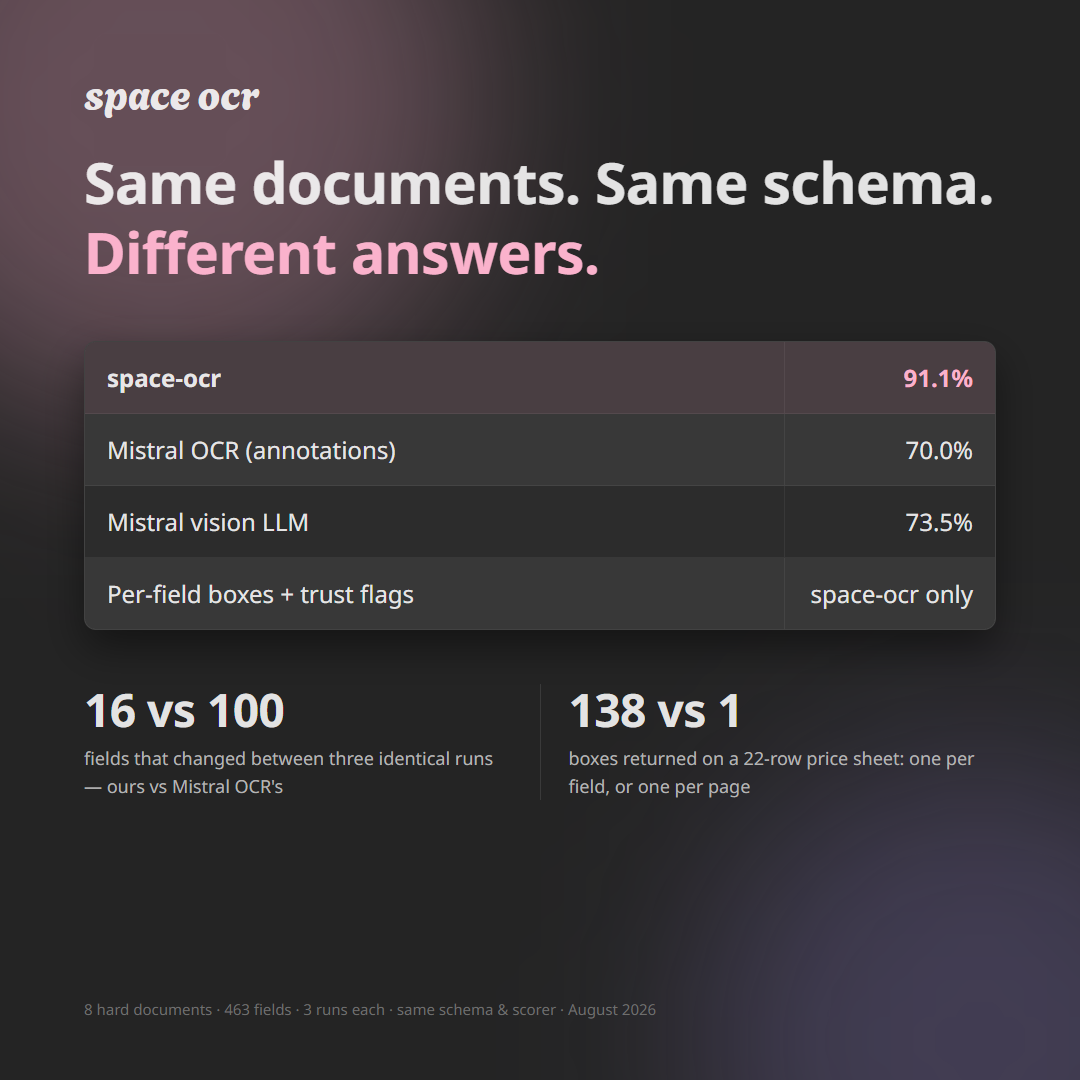
space-ocr read 91.1% of the 463 values to an exact match, averaged over three runs. Mistral's OCR annotations landed at 70.0%, its vision LLM at 73.5%.
Some of every engine's misses are cosmetic: a currency symbol kept, a unit suffix left on a number. So we also stripped out every mismatch that differed only in delimiters or spacing and counted content errors alone. Roughly 23 per run for space-ocr, against 119 for Mistral OCR and 93 for the vision LLM. The gap survives the cleanup.
One more thing before the numbers. The answer key was transcribed against our own pipeline's conventions for where one value ends and the next begins, so every live engine, ours included, loses points to boundary disagreements. Read the gap between the arms. The absolute scores are floors, not grades.
Every document, every score
Mean values correct out of the total, averaged over the three runs.
| document | values | space-ocr | Mistral OCR | Mistral VLM |
|---|---|---|---|---|
| Price sheet, 22 rows, photographed off a monitor | 141 | 139.0 (98.6%) | 139.0 (98.6%) | 133.7 (94.8%) |
| Commission statement | 44 | 42.7 (97.0%) | 39.0 (88.6%) | 34.7 (78.8%) |
| Delivery slip C | 53 | 50.3 (95.0%) | 43.7 (82.4%) | 47.3 (89.3%) |
| Delivery slip B | 37 | 34.3 (92.8%) | 18.0 (48.6%) | 24.3 (65.8%) |
| Two-line supermarket receipt | 13 | 12.0 (92.3%) | 2.3 (17.9%) | 1.3 (10.3%) |
| Chat order, 24 rows (case 2 of 2) | 72 | 61.0 (84.7%) | 21.3 (29.6%) | 41.7 (57.9%) |
| Chat order, 24 rows (case 1 of 2) | 72 | 58.0 (80.6%) | 39.7 (55.1%) | 42.3 (58.8%) |
| Delivery slip A | 31 | 24.7 (79.6%) | 21.0 (67.7%) | 15.0 (48.4%) |
| all | 463 | 422.0 (91.1%) | 324.0 (70.0%) | 340.3 (73.5%) |
The top row is the one to look at first. On the cleanest document in the set, a dense printed table with 141 values, Mistral OCR scored exactly what we did. Reading characters is not where these engines differ, and any comparison that hides that is selling you something.
The bottom of the table is where they do differ, and the pattern is consistent: the harder the layout, the wider the gap. Note also the two chat-order rows. Same photo, same answer key, same schema, sent twice. We came out 3 values apart on the two passes. Mistral OCR came out 18 apart.
Run the same page three times
Totals out of 463, one column per run.
| arm | run 1 | run 2 | run 3 | spread |
|---|---|---|---|---|
| space-ocr | 430 | 414 | 422 | 16 |
| Mistral OCR | 322 | 275 | 375 | 100 |
| Mistral vision LLM | 360 | 329 | 332 | 31 |
A 100-value spread is not noise around a mean, it is two different products. One Mistral OCR run returned 3 of 72 values on a document it had scored 58 of 72 on an hour earlier, because the annotation layer scrambled every column of a 43-row table. Nothing in the response distinguishes that run from a good one.
What the misses actually look like
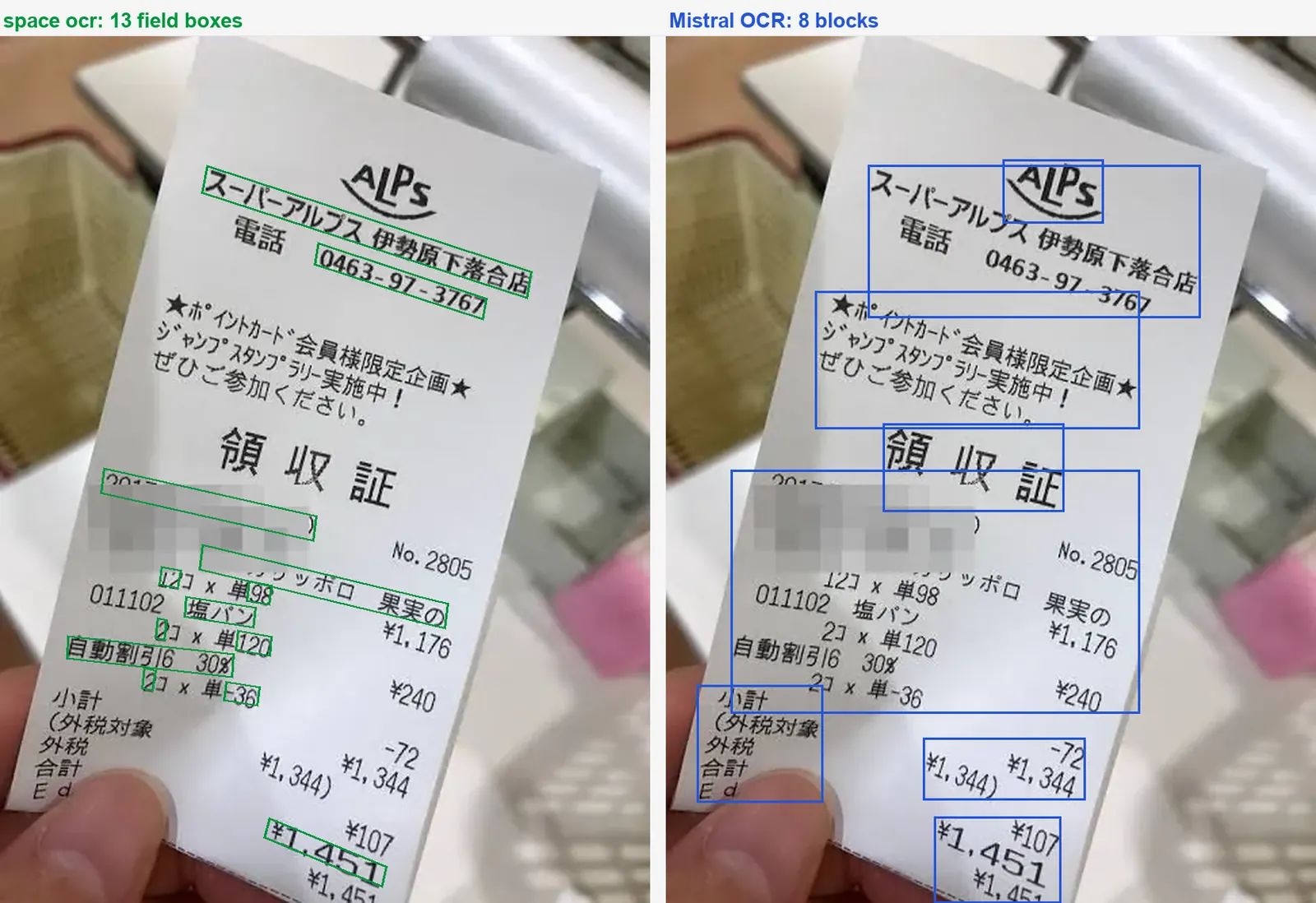
Here is the two-line receipt, run 1, the document with the widest gap. The receipt prints the product name on one line and the quantity and unit price on the next, and the totals block sits directly underneath in the same column.
| value | printed on the page | space-ocr | Mistral OCR |
|---|---|---|---|
| item 1 name | ポッカサッポロ果実の | correct | 006142 ポッカサッポロ 果実の |
| item 1 quantity | 12 | correct | 12コ |
| item 1 unit price | 98 | correct | 単98 ¥1,176 |
| item 2 name | 塩パン | correct | 011102 塩パン |
| date | 2017年07月30日(日) | correct | 2017年07月30日(日) No.2805 |
| total | 1,451 | ¥1,451 | ¥1,451 |
Read the last row before you read the rest. On the total, both engines returned the same thing and both are scored wrong, because the answer key has no currency symbol. That is the kind of miss that inflates every engine's error count, ours included, and it is why the content-only number above matters more than the raw one.
The rest of the column is a different failure. Mistral is not misreading characters there. It is stapling the shelf code to the product name and the price to the quantity line, because it never worked out that two printed lines are one record.
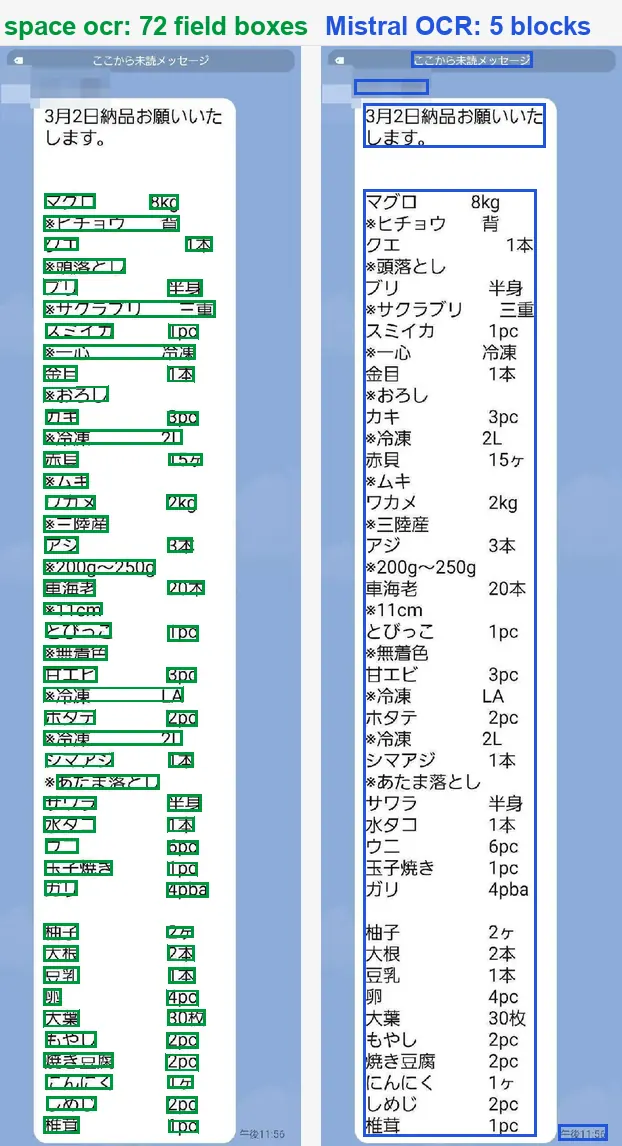
The 24-row chat order fails in a way that is worth seeing in full, because it is the failure mode that costs the most downstream:
| row | printed | Mistral OCR returned |
|---|---|---|
| 1, note | ヒチョウ | (empty) |
| 2, item | クエ | ヒチョウ |
| 2, note | 頭落とし | 背 |
| 3, item | ブリ | クエ |
| 3, note | サクラブリ | (empty) |
Every row has slid up by one. Individually each value is a real string from the page, spelled correctly. As a table it is wrong from the second row down, and nothing about the response looks unusual.
Our own misses on that page were smaller but they were there: ヒチョウ came back as ヒチョウ背, 冷凍 as 冷凍 2L. We merged two adjacent cells instead of shifting the table. On delivery slip B we read a unit price of 1510 as 510, dropping a digit that the neighbouring column had glued on.
The part no score table can show
Ask both engines for the same 141 values on the price sheet and you get two answers back that look equally usable, until you ask where each value came from.
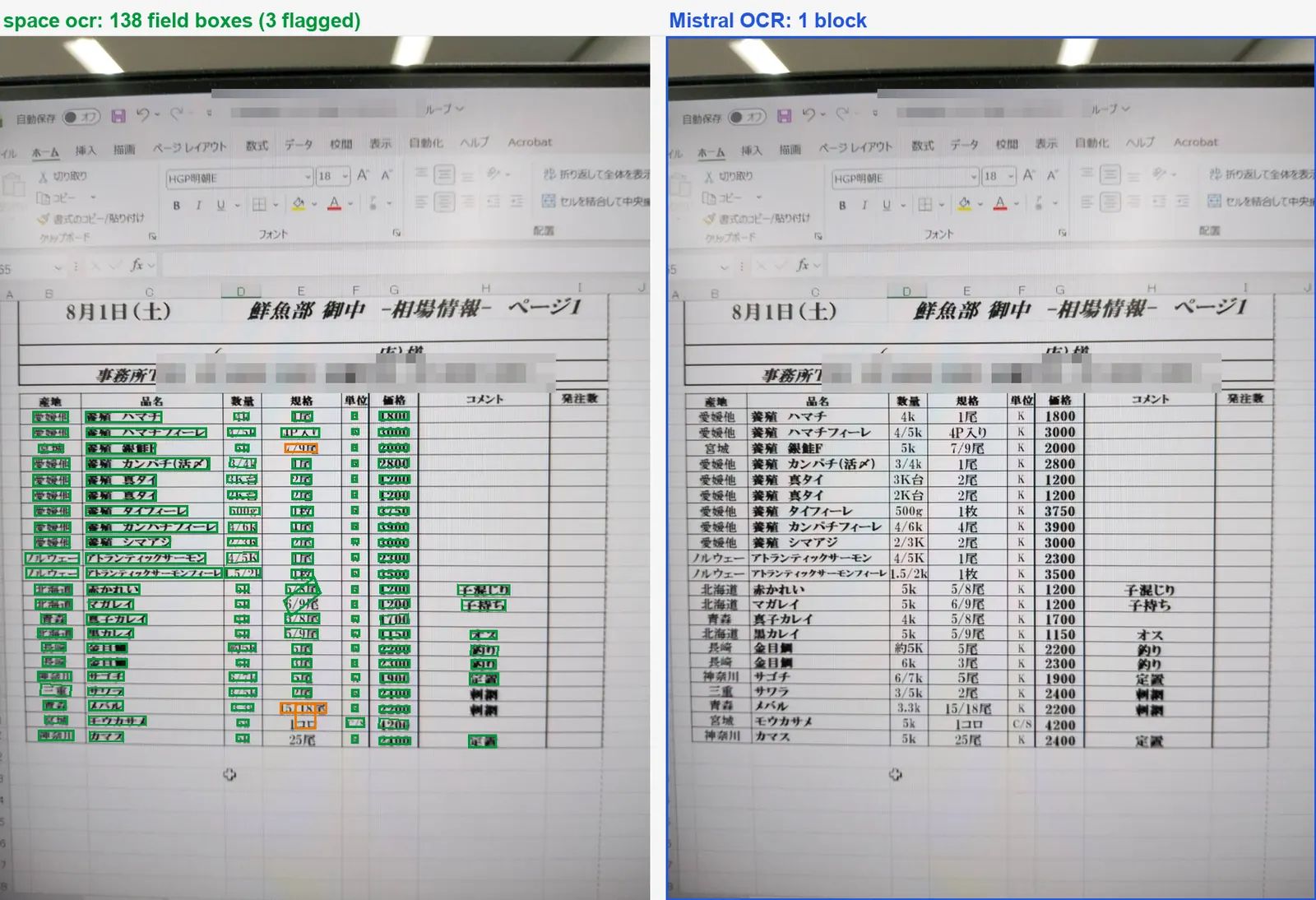
space-ocr returns a box per value, anchored to the pixels it was read from. In the Mistral responses we archived for this benchmark (mistral-ocr-latest, August 2026), the same price sheet came back as a single rectangle covering the whole table. Those responses carried no per-value coordinates, and a paragraph block was the finest granularity we saw in them. What the API returns today is worth checking against Mistral's current documentation before you design around either behaviour.
Those responses carried no verification signal either. Every space-ocr value arrives in data.cells[path]: a box and a quad on a 0 to 1000 grid, a verified verdict, a review object whose reasons array names in machine-readable codes what did not check out, and an evidence object holding the character cross-check itself (text_match), the match_ratio behind it and, when the recogniser can report one, ocr_confidence. The values that want a human are collected in one place, data.review.flagged. Declaring a label on a field anchors which occurrence to take when the same value repeats down a page. Read verified: true for what it is: the checks that ran found nothing, not a promise that the value is the one you wanted.
That is what changes the work. With boxes and a review list, values that are quietly wrong get surfaced, and a person starts from the handful that are flagged instead of re-reading all 141. It is not a net that catches everything, since a cross-check has nothing to raise when both readings agree on the same answer, which is exactly what the total row above looks like. But a flagged wrong value costs a glance, and an unflagged one costs whatever you built on top of it.
The whole set, both engines
All seven photographs, left and right the same image, with the boxes drawn straight from the archived responses of the benchmark's first run. Green is one space-ocr value, orange is one the engine flagged for review in that run, and blue is one Mistral OCR block. Third-party names, addresses, phone numbers, account numbers and staff names are pixelated before publishing, which is also why some boxes sit over grey rectangles.
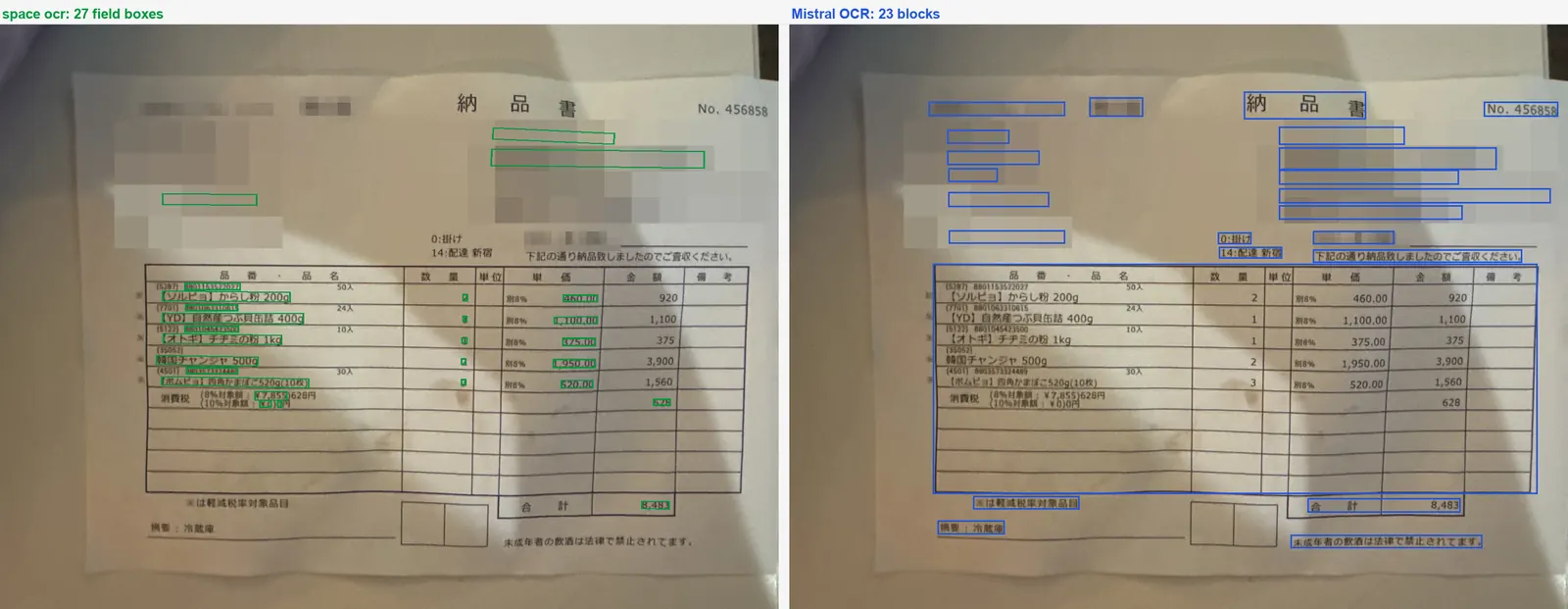
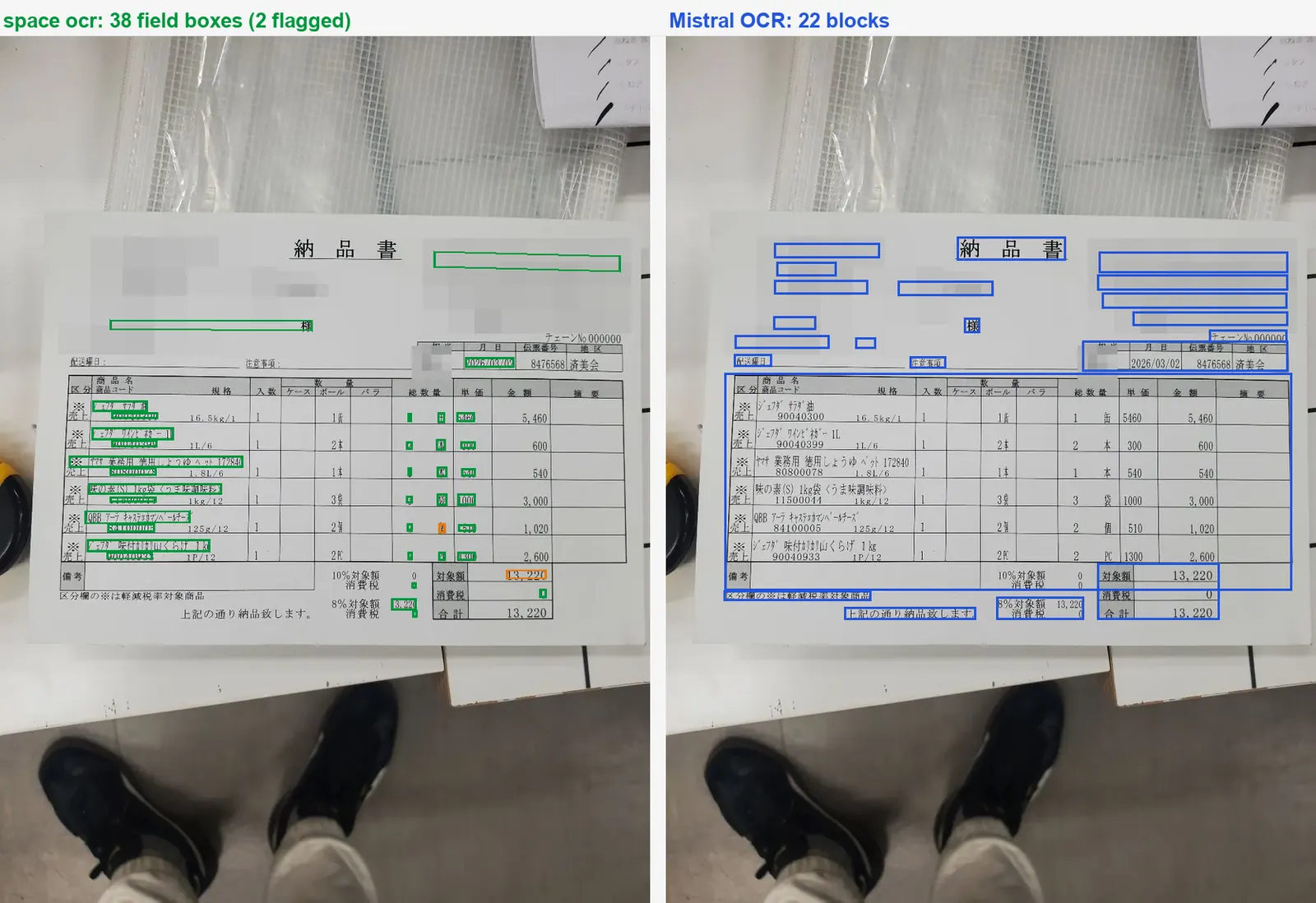
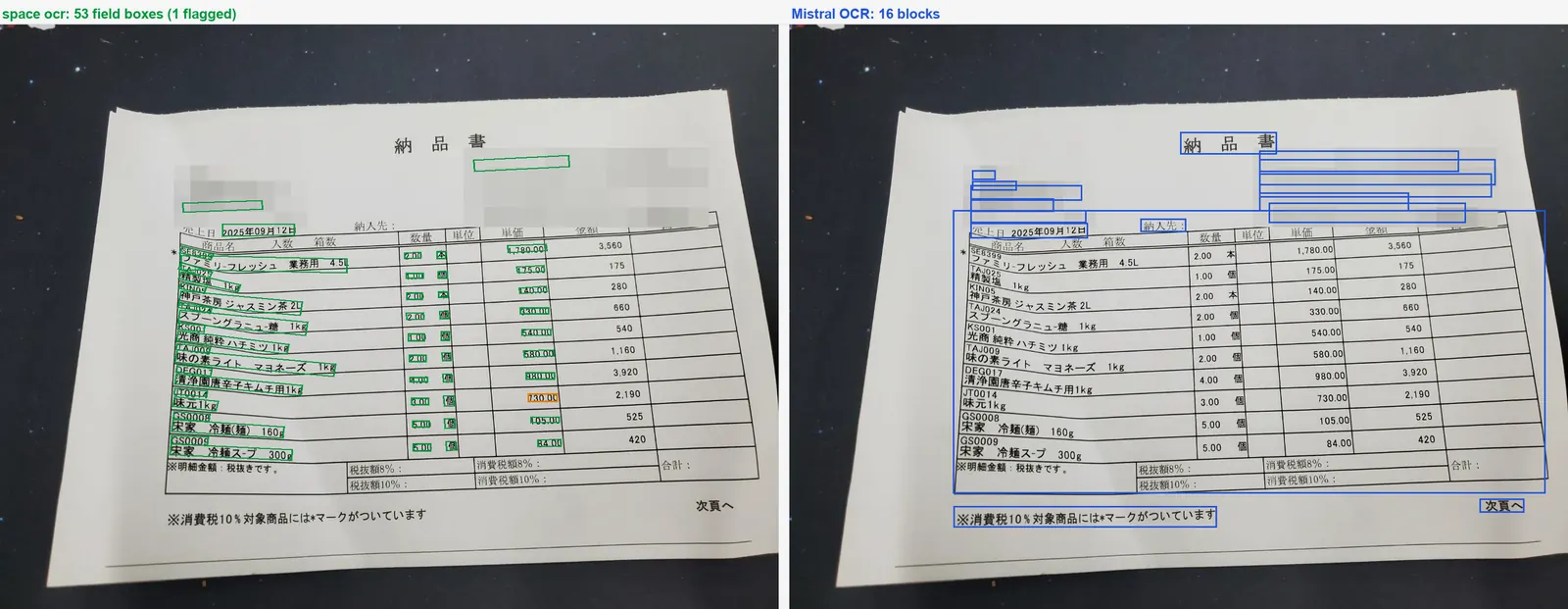
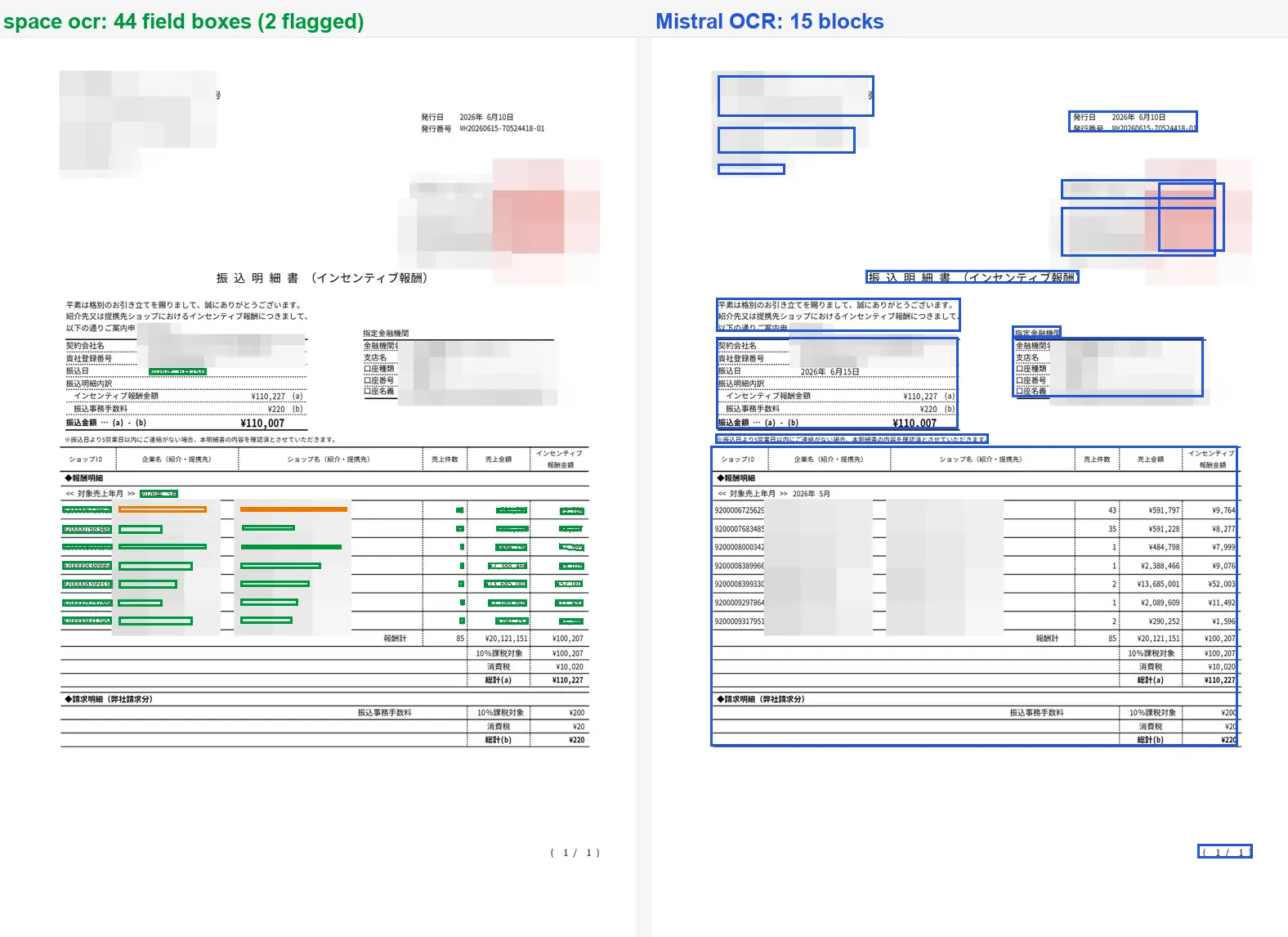
How the verification works, since it is the whole argument: the language model returns values and word-level hints, never coordinates. The engine then matches each returned value character by character against the symbols the OCR pass actually detected on the page, lands the box on those symbols, and scores the match as evidence.match_ratio, where 0.85 and above counts as a confident match. That ratio is one piece of evidence behind the verdict, not a gate on its own: where the two readings disagree, review.reasons picks up a code such as text_mismatch, verified comes back false, and the value joins data.review.flagged, the list of what to look at. Coordinates arrive per value as box, which is xmin/ymin/xmax/ymax on a 0 to 1000 grid, plus quad, four ordered corner points for pages that sit at an angle.
What this does not measure
Field extraction, on eight cases, in August 2026. Not speed, not price, not Mistral's markdown conversion, which is a different product doing a different job and was not part of any run here. Not general document reading either: eight cases from one company's regression suite is a small, deliberately nasty sample, weighted towards Japanese business forms and photographs taken in bad light.
The raw material is all kept: the runner script, the 72 scored runs, every raw response from both vendors, and the script that drew the images above.
The most useful benchmark is still your own. Take five documents that give you trouble, write the answer key by hand first, send the same field list to both APIs, and run each of them three times. The steps below are what we did. A successful scan costs $0.05, failed scans are never charged, and the first 100 pages every month are free, so the running cost of checking this yourself is roughly nothing.
- Pick hard documents, not demosChoose 5 to 10 real pages that hurt: multi-line records, repeated values, photos of screens, dense tables. Clean samples cannot separate vendors.
- Freeze one schema and one instructionWrite the field list once, with the same names and descriptions, and send it identically to every engine. Ask for values exactly as printed.
- Write the ground truth by handTranscribe the expected value for every field before running anything, and do not edit it afterwards.
- Run each engine at least three timesOne run hides instability. Score every run with the same script and look at the spread, not just the mean.
- Count the silent errors separatelyFor each wrong value, note whether the engine flagged it. A wrong value with a review flag costs a glance; a wrong value with no signal costs whatever your process built on top of it.
Is Mistral OCR bad at reading documents?
Can I reproduce this benchmark?
Why should I trust a vendor's own benchmark?
Does space-ocr win on every document?
What do per-field coordinates actually give me?
Run your own benchmark
100 pages free every month. Every value comes back with its box and a trust verdict.