An API for extracting data from invoices
A developer guide to space-ocr's API for extracting data from invoices: POST /ocr/fields with curl & Python, invoice templates, custom fields, and verified bounding boxes.
Pulling structured data off an invoice — vendor, invoice number, date, line totals, tax — is one of the most common document-automation jobs there is, and one of the most tedious to build by hand. Regex over OCR text breaks the moment a vendor changes their layout. Template-matching tools want you to draw boxes for every supplier. What you actually want is an API for extracting data from invoices that reads any layout, returns clean typed fields, and — crucially — tells you where on the page each value came from so you can trust the result.
That last part is the whole game. An invoice extraction endpoint that hands back total: 2,045 with no provenance is a liability in an accounts-payable pipeline. This guide walks through space-ocr's POST /ocr/fields endpoint: a single synchronous call that takes one invoice image, applies a built-in invoice template (or your own field schema), and returns every value with a verified bounding box.
See the output before you write a line of code
Below is a real parsed receipt. Hover any field and the box on the image lights up — that box is exactly where the value was read from, and each field carries its own match ratio. Invoices behave the same way: every field you extract lands back on the pixels it came from.
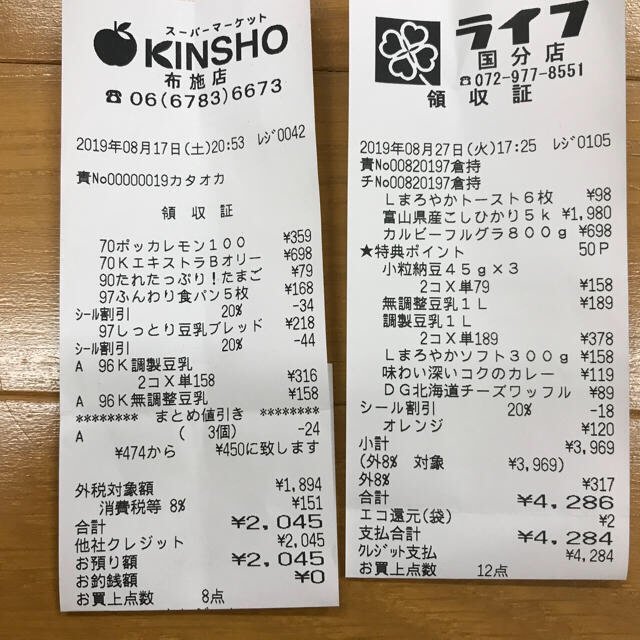
Every value carries a verified on-page location — bbox + 4-point vertices + match_ratio — on a 0–1000 normalized grid (0,0 top-left → 1000,1000 bottom-right), the same shape the live API returns. Hover a field to trace it back to the pixels it came from.
Authentication and base URL
The public API lives at a single base — https://api.space-ocr.com — with no /v1 path versioning. Every request authenticates with an HTTP Bearer token whose key is prefixed spocr_:
Authorization: Bearer spocr_xxxxxxxxxxxxxxxx
A missing or malformed header returns 401; an unrecognized key returns 403. Every response carries an X-Request-Id header (format req_xxx) you should log for support traces. The full spec is published as OpenAPI 3.1 at GET /openapi.json if you'd rather generate a client.
The simplest call: a built-in invoice template
The fastest path is templateId: "invoice" — a predefined schema that knows what an invoice looks like, so you don't have to describe fields yourself. Pass the image as a URL or pure base64 (the imageType is auto-detected from an http(s):// prefix), and you get typed fields back.
curl -X POST https://api.space-ocr.com/ocr/fields \
  -H "Authorization: Bearer spocr_xxxxxxxxxxxxxxxx" \
  -H "Content-Type: application/json" \
  -d '{
    "image": "https://example.com/invoices/inv-4471.jpg",
    "imageType": "url",
    "templateId": "invoice"
}'Camel-case is the canonical form. Parameters are imageType, templateId, autoFields. The legacy snake_case aliases (image_type, template_id, auto_fields) still work but are deprecated — prefer the camel-case names in new code.
The response shape
A successful call returns { status: "success", data: { ... } }. Each extracted value carries its own provenance, and a field_bboxes map gives coordinates per field:
bbox— an axis-aligned rectangle{ xmin, ymin, xmax, ymax }on a 0–1000 normalized grid (0,0 = top-left, 1000,1000 = bottom-right), independent of the image's pixel size. Convert to pixels withpixel_x = bbox_x / 1000 × image_width.vertices— four ordered points{x, y}(top-left → top-right → bottom-right → bottom-left) forming an oriented box that follows the document's tilt, so a skewed phone photo of an invoice still boxes cleanly.match_ratio— the fraction of the value's characters actually located on the page (0–1). A field is treated as confidently matched at ≥ 0.85;1.0means every character was found.bbox_source— how the coordinate was derived:token_id(the deterministic word-token lookup, match ratio 1.0),token_id_hybrid,vision_symbol_match,low_confidence, orshared_value.
{
  "status": "success",
  "data": {
    "total": "2,045",
    "field_bboxes": {
      "total": {
        "bbox": { "xmin": 595, "ymin": 974, "xmax": 781, "ymax": 1000 },
        "vertices": [
          { "x": 594, "y": 975 }, { "x": 781, "y": 972 },
          { "x": 781, "y": 998 }, { "x": 595, "y": 1000 }
        ],
        "match_ratio": 1.0,
        "bbox_source": "token_id"
      }
    }
  }
}The model never invents the coordinates. The language model returns each value plus the IDs of the word tokens it used — it does not return bounding boxes. The engine then looks those tokens up in the underlying vision OCR and unions their boxes. A model can hallucinate text; it cannot hallucinate a position the vision layer never detected. A value that isn't really on the invoice has no tokens to anchor to. See why bounding boxes make OCR auditable for the full reasoning.
Custom fields when the template isn't enough
Real invoices have fields a generic template won't name — a PO reference, a payment-terms code, a project tag. Pass a fields array of FieldSpec objects instead of (or alongside) a template. Each FieldSpec is { name, type, description?, children? }. If you send both fields and templateId, fields wins.
The description is where you steer the model: it's plain English instructions for what to capture and how. And type: "array" with children is how you pull repeating line items — one child schema, many rows. (We go deep on that in extracting line items from invoices.)
import requests, base64

with open("invoice.jpg", "rb") as f:
    b64 = base64.b64encode(f.read()).decode()

resp = requests.post(
    "https://api.space-ocr.com/ocr/fields",
    headers={"Authorization": "Bearer spocr_xxxxxxxxxxxxxxxx"},
    json={
        "image": b64,
        "imageType": "base64",
        "fields": [
            {"name": "vendor", "type": "string",
             "description": "Supplier / billing company name"},
            {"name": "invoice_no", "type": "string",
             "description": "Invoice number, verbatim"},
            {"name": "invoice_date", "type": "string"},
            {"name": "total", "type": "string",
             "description": "Grand total, keep comma separators"},
            {"name": "line_items", "type": "array",
             "description": "One row per line on the invoice",
             "children": [
                 {"name": "description", "type": "string"},
                 {"name": "qty", "type": "number"},
                 {"name": "unit_price", "type": "number"},
             ]},
        ],
    },
    timeout=60,
)

data = resp.json()["data"]
print(data["total"], data["field_bboxes"]["total"]["match_ratio"])Values are preserved verbatim. A total of 7,855 comes back as the string "7,855" — comma separators, decimals, and full-width characters intact. The engine only normalizes when a field's description explicitly asks it to. The ¥ you see in the web UI is decoration, not part of the value. The engine accepts raster images only — JPEG, PNG, GIF, BMP, TIFF, WebP — and auto-converts to RGB.
Going async: batch uploads, jobs, and webhooks
POST /ocr/fields is synchronous and perfect for a single invoice in a request/response loop. For a folder of invoices, post them to a sheet with POST /upload (multipart files, repeated). By default it returns immediately with a jobs array:
{ "path": "...", "jobs": [ { "uniqueKey": "...", "jobId": "...", "status": "pending" } ] }
You then learn the outcome two ways: poll GET /jobs/{jobId}, or register a webhook. Webhooks are one URL per space, HMAC-SHA256 signed via the X-Spaceocr-Signature header. The events you'll care about are upload.received, item.created, ocr.completed (with data.result carrying the extraction), and ocr.failed. Always verify the signature before trusting a payload.
Idempotency, request tracing, and rate limits
A few headers make a production pipeline safe to retry:
| Header | Purpose |
|---|---|
Idempotency-Key | On /upload and /create, a repeat with the same key replays the cached response for 24h (X-Idempotent-Replay: true) — safe retries with no double charge. |
X-Request-Id | Returned on every response (req_xxx); log it for support. |
Rate limits are 60 requests/min per key and 600 requests/min per uid, on a fixed 60-second window. Exceed them and you get 429 with error.code: "rate_limited". The wait time is in the JSON body as details.retryAfterSec — there is no Retry-After HTTP header, so back off on the body value.
{
  "error": {
    "code": "rate_limited",
    "message": "Rate limit exceeded",
    "requestId": "req_8fa2c1"
  },
  "details": { "retryAfterSec": 12 }
}
From extraction to a queryable sheet
Once invoices are extracted into a sheet, you don't re-run OCR to read them back. GET /view runs server-side queries over stored rows — where, sort, select, limit, offset — with no charge and no re-extraction. The bounding boxes ride along by default; add boxes=0 for a leaner payload. From there you can export to CSV (UTF-8 BOM, so Excel and CJK text open cleanly) — see turning scanned documents into CSV.
Pricing
POST /ocr/fields costs ¥10 per call, and POST /upload is ¥10 × N images. There's no charge on failure — if OCR returns no result, it's refunded, and a 502 engine error or ocr.failed event refunds automatically. Read-only endpoints (GET /space, /view, /amount, /health) are free. The free tier is 100 scans/month with no credit card; Pro is $39/month; Business is contact-sales.
How to extract data from an invoice with the API
What is the best API for extracting data from invoices?
Can I extract invoice line items as well as header fields?
Does the invoice extraction API accept PDFs?
How are invoice extraction API errors and rate limits handled?
How much does it cost to extract data from an invoice?
Extract your first invoice in one call
Free tier — 100 scans a month, no credit card. Every field comes back with its on-page location.