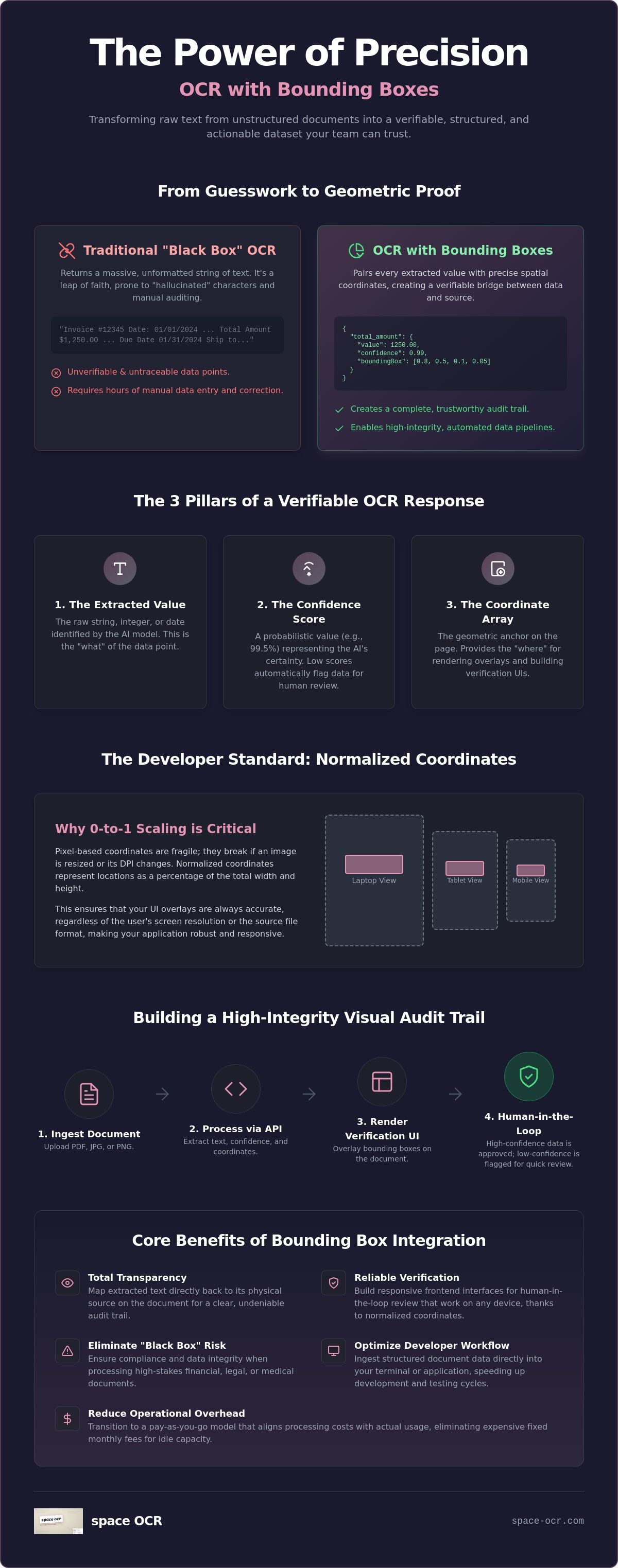
Implementing a Structured Field OCR API with Bounding Boxes in 2026
A practical 2026 guide to implementing a structured-field OCR API with bounding boxes for verifiable, audit-ready document data pipelines.

A string of text without a coordinate is just a guess, not a data point. If you've ever spent hours manually auditing "hallucinated" characters from a black-box extractor, you've realized that raw text isn't enough for production-grade automation. You need to see exactly where the data originated. Integrating a modern OCR API with bounding boxes turns your workflow from a leap of faith into a verifiable audit trail. It's the technical foundation for moving past the inefficiency of fixed subscription costs and rigid, unscalable processing models.
You'll see how to use these spatial coordinates to build high-integrity, structured data pipelines that support reliable human-in-the-loop verification. We'll walk through the mechanics of mapping JSON outputs directly to document regions, and how to build a system that scales with your actual workload. This guide breaks down structured field extraction, the shift toward vision-language models in 2026, and the logic needed to cut manual entry down to review-only. By the end, you'll have a blueprint for turning unstructured documents into precise, actionable datasets your team can actually trust.
Key Takeaways
- Learn how an OCR API with bounding boxes uses precise spatial coordinates to map extracted text directly back to its physical source for total transparency.
- Understand why a normalized 0–1000 coordinate grid keeps frontend verification overlays stable across screen sizes and image DPI.
- Implement visual audit trails to remove the "black box" risk and keep processing of high-stakes financial or legal documents auditable.
- Call the REST API straight from your terminal with the Claude Code plugin — a two-line install of a dependency-free Python client.
- Cut operational overhead by moving to a pay-as-you-go model that aligns costs with actual processing volume rather than fixed monthly fees.
Table of Contents
- What is an OCR API with Bounding Boxes?
- Technical Architecture: Coordinates, JSON, and Confidence
- Why Verifiability is the New Standard for Document Data
- Integrating Bounding Boxes into Developer Workflows
- space-ocr: Pay-As-You-Go Structured Data with Zero Friction
What is an OCR API with Bounding Boxes?
A standard Optical Character Recognition (OCR) engine typically returns a massive, unformatted string of text. That works for simple search indexing, but it fails in automated data pipelines. An OCR API with bounding boxes is a specialized interface that pairs every extracted field with its precise spatial location on the document. By returning coordinates for every value — an integer box of xmin, ymin, xmax, ymax on a normalized 0–1000 grid — the API creates a bridge between the digital data and the physical source. You aren't just getting a value like "$1,250.00"; you're getting the exact location of that value on the page.
This distinction is critical for structured extraction. Traditional OCR treats a document as a flat text file. Structured OCR treats it as a collection of data objects. In 2026, the industry has shifted away from raw text dumps toward verifiable data structures. If your system extracts a tax ID, you need the ability to programmatically highlight that field in a verification UI. Without bounding boxes, you have no way to audit the model's work short of re-reading the entire page. A string of text without a coordinate is a liability in a high-stakes workflow.
Bounding Boxes vs. Bounding Regions
Most implementations rely on the standard four-point rectangle. These bounding boxes are computationally inexpensive and work well for digital-native pages or cleanly scanned forms. Real-world documents, though, often arrive skewed, rotated, or wrinkled. For those, a plain axis-aligned box isn't enough. space-ocr returns both an axis-aligned box (integer xmin/ymin/xmax/ymax) and a four-point oriented quad — ordered top-left, top-right, bottom-right, bottom-left — that follows the document's tilt. That gives you the precision a plain box can't for warped or rotated layouts, while keeping the simple box available for everything else.
Key Components of a Modern OCR Response
POST /ocr/fields answers with a single data object built in four layers. They are worth keeping apart, because each answers a different question and only one of them belongs in your database as-is:
data.values— the business data, in exactly the schema you declared. Nothing reserved is mixed in, so it can be stored as-is. It is the model's reading of the page rather than a byte-for-byte copy of the print; when you need an exact string comparison, usecells[path].evidence.printed_text, which is what the OCR pass read at those coordinates.data.cells[path]— where each value came from and what the checks concluded, keyed by path:total,items[0].amount. Each entry carries abox(integerxmin/ymin/xmax/ymax) and a four-pointquad, averifiedverdict, areviewobject that is eithernullor{ reasons }, andevidence— the working behind the verdict, includingtext_match,source,match_ratio,ocr_confidenceandprinted_text.data.review— the document-level tally, and inflaggeda machine-readable list of what a person should look at:[{ path, reasons }], using the same path grammar as thecellskeys. The number of things to review isflagged.length; there is no separate counter.by_reasoncounts every reason on every flagged field, so its sum can exceed that number.data.normalized— the deterministic typed reading. It is present only where a field declared a scalar type (number,integer,date) or astringcarryingpatternorenum, and it is a sparse tree shaped exactly likevalues, sonormalized.totalsits besidevalues.total. Parsing is deterministic and costs no extra model call; a leaf that will not parse comes backnull, with the reason incells[path].normalized.error.
Beside those four sits data.image (width and height in pixels) — the frame every coordinate is measured against.
Those layers are what make extraction transparent. The gate to build logic on is a single condition rather than a threshold you tune: a cell whose review is null passed every check that ran, which is the same thing its verified: true says. match_ratio has not gone anywhere — it is one signal inside evidence, behind the verdict rather than being the verdict. And where a value has to come from a particular place on the page, the request itself can say so: label anchors coordinates to the occurrence printed beside a given label, and near / not_near declare the vocabulary that must, or must not, sit next to the value. That level of control is what separates basic character recognition from a Structured Field OCR API.
Technical Architecture: Coordinates, JSON, and Confidence
Building a document pipeline requires more than character detection; it requires a spatial understanding of the data. When you integrate an OCR API with bounding boxes, the most important architectural decision is how to handle coordinates. Raw pixel coordinates are fragile. If your source image is resized, re-encoded, or adjusted for DPI during pre-processing, absolute pixel values become useless. That's why space-ocr returns coordinates on a normalized 0–1000 grid instead of pixels: (0,0) is the top-left corner and (1000,1000) is the bottom-right, independent of the image's actual pixel dimensions. To draw a box, you scale back up — pixel_x = xmin / 1000 * image_width — so your frontend can render overlays at any resolution without recomputing the underlying geometry. The image_width in that formula comes from data.image, and it is worth being precise about what that describes: the page as it was read — after EXIF orientation has been baked into the pixels (send 4000×3000 and you can get 3000×4000 back) and after any server-side downscale. It is not the file you posted. Draw against data.image and the outlines land; draw against the original file's dimensions and a rotated or downscaled page is off by exactly that difference. There is no deskew step either, so a tilted photo's quad follows the tilt instead of straightening it.
The engine and the API work on raster images, not PDF bytes. When you drop a multi-page PDF into the space-ocr web app, it renders each page to a PNG with pdf.js and runs OCR on those page images; against the API directly, you send one image per request, converting PDF pages to images first. Every coordinate refers to the page image it came from — there's no page-index-nested payload to untangle. To keep bad data out of your database, gate on the verdict rather than on a number: a cell whose review is null — equivalently verified: true — passed every check that ran, while anything carrying reasons is listed in data.review.flagged with those reasons attached. The reason vocabulary is fixed and documented (text_mismatch, low_ratio, weak_source, nobox, missing, and the rest), so a queue can route on the reason instead of on a score. The working behind the verdict rides in evidence: source (for example vision_symbol_match), ocr_confidence, and match_ratio — the share of the value's characters found again among the symbols the OCR pass detected on the page, from 0.0 to 1.0. That ratio is coverage against the page, not a model self-confidence score; 0.85 and above counts as a confident match, and it is one input to the verdict rather than the gate itself. Gating this way keeps unverified values out of your database while high-coverage extractions flow through automatically.
Anatomy of a Structured JSON Response
Field-level extraction maps specific keys, such as an invoice number or a tax ID, to precise geometric anchors. Line items in a table get more involved: an array field expands into rows, and every cell gets its own entry in data.cells under an indexed path, so the relationship between rows and columns stays intact. A row path like items[0] is the union box of the whole row, and items[0].amount is one cell inside it — the same grammar review.flagged[].path uses, so a flagged path is a direct lookup into cells.
Here is one response with all four layers in view. The request declared invoice_no, date, items[] and total; cells holds one entry per path, so it is trimmed here to the two under discussion.
{
  "status": "success",
  "data": {
    "values": {
      "invoice_no": "",
      "date": "2025-04-10",
      "items": [
        { "name": "Milk", "qty": "1", "amount": "$1.99" }
      ],
      "total": "$4.94"
    },
    "cells": {
      "items[0].amount": {
        "box": { "xmin": 693, "ymin": 460, "xmax": 738, "ymax": 488 },
        "quad": [{ "x": 693, "y": 460 }, { "x": 738, "y": 460 }, { "x": 738, "y": 488 }, { "x": 693, "y": 488 }],
        "verified": false,
        "review": { "reasons": ["text_mismatch"] },
        "evidence": { "text_match": false, "source": "vision_symbol_match", "match_ratio": 0.62, "ocr_confidence": 0.88 }
      },
      "total": {
        "box": { "xmin": 380, "ymin": 720, "xmax": 530, "ymax": 742 },
        "quad": [{ "x": 380, "y": 720 }, { "x": 530, "y": 720 }, { "x": 530, "y": 742 }, { "x": 380, "y": 742 }],
        "verified": true,
        "review": null,
        "evidence": { "text_match": true, "source": "vision_symbol_match", "match_ratio": 1.0, "ocr_confidence": 0.98 },
        "normalized": { "value": 4.94, "type": "number", "method": "deterministic" }
      }
    },
    "review": {
      "unit": "field",
      "declared": 6,
      "returned": 5,
      "boxed": 5,
      "verified": 4,
      "flagged": [
        { "path": "items[0].amount", "reasons": ["text_mismatch"] },
        { "path": "invoice_no", "reasons": ["missing"] }
      ],
      "by_reason": { "text_mismatch": 1, "missing": 1 }
    },
    "normalized": { "total": 4.94 },
    "image": { "width": 1654, "height": 2339 }
  }
}
Read it in order and the contract is visible. values is the data. cells says where each value sits and what the checks concluded — items[0].amount disagreed with the print, so it comes back verified: false with reason text_mismatch, while total agreed and carries its evidence. review.flagged is the work list: that amount, plus invoice_no, which was declared required and never came back. That last one is the single class the character cross-check can never reach, because a value that was never returned has nothing to disagree with. And normalized carries the typed reading of total without touching the string in values. This shape is what lets an application treat the document as a queryable dataset rather than a flat image.
Verification Lives Beside Extraction
Coordinates can say where a value came from; they cannot say whether it belongs in that column. The second question is answered by the same request that asks for the fields. Beside name and type, a FieldSpec takes declarations, and each one has a matching reason waiting in review:
required— a field that comes back empty, or not at all, is listed with reasonmissing. It is the one class character cross-checking can never reach.label— the label printed next to the value. When the same value appears more than once on the page, coordinates anchor to the occurrence beside that label. It fires only when the label is printed exactly once; otherwise the search falls back and says so inreview.notesaslabel_unresolved.pattern— a regex the value must satisfy (string fields only; JSON-Schema partial matching, so anchor with^…$to check the whole value). A violation raisespattern_mismatch.enum— the value set your business already owns: a vendor master, an item catalogue, a unit list. A value outside the set raisespattern_mismatch. It is also the only handle on the case where both engines agree on the same misread — character cross-checking is structurally silent when both sides make the same mistake.min/max— inclusive bounds for anumberorinteger, checked against the normalized number; outside the range raisesout_of_range.near/not_near— vocabulary that must, or must not, be printed beside the value:["御中", "様"]for an addressee,["登録番号", "〒", "TEL"]for an issuer block. The reasons arenear_mismatch,near_ambiguousandnear_conflict, and they reach the case where the model read perfectly but took the value from the wrong spot. They do not make the pick right; they make a wrong pick visible.
None of these declarations is shown to the model. Extraction does not get more accurate because you declared them — the values come back the same either way. What they produce is a review signal, and for label a coordinate anchor, which is the part a program can act on.
Implementing Asynchronous Job Processing
Processing large batches of documents needs an asynchronous path to avoid timeouts and resource exhaustion. Using a REST API for document processing, you can submit files in bulk and get back a job ID per image (each job starts as status "pending"). Polling is a simple way to check for completion, but production setups should use webhooks. A webhook pushes the final JSON payload — including all bounding box data — to your server the moment processing finishes. This event-driven approach is what lets you scale to thousands of images on a pay-as-you-go architecture. If you want to test these workflows without an upfront commitment, space-ocr handles variable workloads without minimums.
Why Verifiability is the New Standard for Document Data
Trusting a model blindly is a compliance problem. If your system ingests data without a source reference, you're operating in a black box. An OCR API with bounding boxes shifts the model from blind trust to evidence-based extraction: it provides a visual audit trail that shows exactly where a data point came from. That matters for high-stakes financial and legal documents, where a single misread character can create real liability. You need to know that the "Total Due" came from the bottom-right corner, not from a stray date string elsewhere on the page.
With a human-in-the-loop UI, you overlay these boxes directly onto the document image so an operator can check the model's work quickly. Manual data entry generally carries an error rate in the low single digits, and box-level verification cuts the time it takes to catch those mistakes: instead of scanning a full page for an invoice number or a tax ID, the operator jumps straight to the highlighted region. You're building a system that isn't just functional — it's auditable. That transparency is what makes automated workflows viable in regulated settings.
OCR for Financial Compliance
Auditors need proof. When you store bounding box metadata alongside extracted fields in "Spaces," you create a permanent link between the digital record and the original image — verifiable evidence during an audit. To secure the pipeline, use HMAC-signed webhooks (signature header X-Spaceocr-Signature, HMAC-SHA256) to receive your data, so you can confirm the payload wasn't tampered with between the API and your internal database. Reliability isn't a nice-to-have for financial infrastructure; it's the baseline.
Handwritten Text to Structured Data
Handwriting is notoriously hard for traditional engines. Extracting handwritten text to structured data is complex because of non-standard layouts and varying penmanship. Bounding boxes matter here: they let you visualize the model's path through messy handwritten notes or faxes. If a field lands out of place on a complex form, the coordinate data lets you correct the alignment programmatically. You aren't guessing — you're using geometric anchors, each carrying its own verdict and evidence in cells, to fix errors and keep the final dataset honest. Where the pass cannot tie a value to a place on the page at all, that does not disappear quietly either: it comes back in the review list with reason nobox.
Integrating Bounding Boxes into Developer Workflows
Raw JSON is only the start. To get the full value of an OCR API with bounding boxes, integrate it into your existing developer environment. The workflow has moved from manual file uploads toward CLI-driven automation. By calling OCR from your terminal, you cut the friction of switching between browser tabs and your IDE, and you can filter or transform specific fields using their spatial coordinates on the fly.
Automating the move from images to structured sheets is a common use case for high-volume teams. You can use the extract table data from PDF API to identify row boundaries and column headers, mapping them to a CSV or database schema. This isn't only about text; it's about structural geometry. When your script knows the box coordinates of a table cell, it can validate that a value belongs in a specific column. On the server side, the GET /view API queries a saved sheet with where, sort, and select filters — no OCR re-run, no extra charge — while in the app, "Spaces" is a searchable, editable sheet with global keyword search and keyboard grid navigation.
The Claude Code Plugin
The Claude Code plugin installs in two lines — /plugin marketplace add oisidonut/claude-space-ocr-skill, then /plugin install space-ocr@space-ocr — and drops a dependency-free Python client into your session. Running the client itself takes no pip install, no SDK and no MCP server — it is one standard-library script calling the REST API directly. (If you would rather connect an agent over MCP, space-ocr publishes an endpoint at https://mcp.space-ocr.com/mcp; the plugin is simply the other route.) From the terminal you send a document image (invoice, receipt, business card, ID, form) to the space-ocr REST API and get structured fields back, each with its box and quad in cells and a verified verdict beside it, or you query documents you've already scanned. It's a practical tool for builders who want the API without leaving their environment.
Webhooks and Automation
Scaling needs event-driven logic. Webhooks let you trigger downstream actions the moment a document finishes processing. For example, you can move the output of the extract data from receipts API into your bookkeeping workflow by listening for the "ocr.completed" event. Whether you're using Zapier, Make, or a custom Node.js backend, the payload arrives with its verification layer attached: review.flagged is already the list of paths worth a second look, so a script can post the clean documents and route the rest to a person without inventing a score of its own. To start building these pipelines today, get started with space-ocr and route verifiable data into your stack.
space-ocr: Pay-As-You-Go Structured Data with Zero Friction
The era of rigid, flat-rate-only subscriptions is over. If your document volume fluctuates, paying for unused capacity is overhead you don't need. space-ocr charges $0.05 per successful image, so your costs scale linearly with actual usage — and you're only billed for extractions that return a result. That pragmatism extends to the feature set: while some providers treat spatial metadata as a premium add-on, space-ocr returns an OCR API with bounding boxes as a standard capability. Verifiability is a baseline requirement for data integrity, not a tier upgrade.
Getting to the Structured Field OCR API shouldn't require a procurement hurdle. You can start on a free tier — 100 scans a month, no credit card — and test coordinate precision on your own document types. The path from sign-up to your first successful JSON payload is short. Whether you're a startup processing a few hundred invoices or a team handling far more, pricing stays predictable and the data stays verifiable.
Managing Data in Spaces
In the app, "Spaces" is the bridge between raw API output and your team's day-to-day work. It's a searchable, editable sheet where every extracted field stays linked to its box on the original document. You can review extractions and make manual corrections, with every value still tied to the box it came from. Global keyword search finds any value across a sheet, and keyboard grid navigation makes it quick to move around. When you need programmatic filtering, the GET /view API queries a saved sheet server-side with where, sort, and select — for example total>=40000 or vendor~ABC — returning only the matching rows, with no OCR re-run and no charge.
Getting Started in Minutes
Integration is built for immediate use. You can generate an API key and process your first image in a few minutes. For CLI-based extraction, the Claude Code plugin lets you send local files from the terminal and receive structured data without leaving your environment. The path from raw image to a validated data object is short. If you're ready to cut manual entry and build a high-integrity pipeline, start processing documents with verifiable bounding boxes for free on space-ocr.
Scaling Verifiable Document Workflows
Moving from raw text extraction to high-integrity data objects is no longer optional for production-grade automation. You've seen how spatial coordinates serve as an audit trail, turning a "black box" extraction into a verifiable record. By implementing an OCR API with bounding boxes, you give your team the geometric anchors needed for fast human-in-the-loop verification and precise field mapping. This shift removes the ambiguity of unstructured data and replaces manual entry with an auditable pipeline.
Reliability doesn't have to come with a restrictive flat-rate price tag. With $0.05 per successful image and native Claude Code plugin support, you can call these capabilities from your CLI or backend services without friction. Verifiable bounding boxes are a standard requirement for modern data integrity, so they're included by default and every value stays checkable against the page. It's time to build a system that invites verification rather than hiding behind an opaque interface. Get started with space-ocr for free and start deploying high-precision extraction today.
Frequently Asked Questions
What is the difference between a bounding box and a bounding region in OCR?
A bounding box is an axis-aligned rectangle. space-ocr returns it as four integers — xmin, ymin, xmax, ymax — on a normalized 0–1000 grid, which is efficient and works well for clean, digital-native documents. For skewed, rotated, or warped scans, space-ocr also returns a four-point oriented quad (quad, ordered top-left, top-right, bottom-right, bottom-left) that follows the document's tilt, giving you precision a plain box can't for physically distorted pages.
How do I use the bounding box coordinates to draw on an image in Python?
space-ocr returns coordinates on a 0–1000 grid, so scale them by the image dimensions to get pixels. For a 1000-pixel-wide image an xmin of 500 maps to pixel 500 (pixel_x = xmin / 1000 * image_width); for a 2000-pixel-wide image the same xmin of 500 maps to pixel 1000. Take those dimensions from data.image rather than from the file you uploaded: that is the page as it was read, after EXIF rotation and any server-side downscale. Compute xmin, ymin, xmax, and ymax in pixels, then use Pillow or OpenCV and call draw.rectangle to render the overlay for visual verification.
Can the OCR API with bounding boxes recognize handwritten text?
Yes — handwritten notes and faxes go through the same structured-field path as printed documents, and every field comes back with its coordinates in cells, so you can map messy penmanship to specific keys. Handwriting is where anchoring is hardest, and the response says so instead of hiding it: a value the pass cannot tie to a place on the page is listed in review.flagged with reason nobox, and one whose characters disagree with the print gets text_mismatch. That geometric context, plus an explicit list of what did not check out, is what lets you catch and correct the misalignments common on non-standard, hand-filled forms.
Does space-ocr support multi-page PDF documents?
The space-ocr web app supports multi-page PDFs: it renders each page to a PNG and runs OCR on those page images, so each page is processed as its own raster image. The OCR engine and the REST API work on images, not PDF bytes — against the API you convert PDF pages to images first and send them one per request. Coordinates always refer to the page image they came from, so there's no page-index nesting to reconcile.
How much does it cost to use the space-ocr API with bounding boxes?
space-ocr is pay-as-you-go: $0.05 per successful image, and you're only charged for extractions that return a result — failures aren't billed. Every account also gets 100 free scans a month. There's no per-page or per-field pricing, so your costs track actual volume rather than a fixed monthly minimum.
Is there a Claude Code plugin for space-ocr?
Yes. It installs in two lines — /plugin marketplace add oisidonut/claude-space-ocr-skill, then /plugin install space-ocr@space-ocr — and adds a dependency-free Python client that calls the space-ocr REST API directly: running it takes no pip install, no SDK and no MCP server. (If you would rather connect an agent over MCP, space-ocr publishes an endpoint at https://mcp.space-ocr.com/mcp; the plugin is just the other route.) From your terminal you can turn a document image into structured fields or query documents you've already scanned, without switching to a browser.
What is the accuracy level of the bounding boxes provided?
Every value comes back with a verdict rather than a bare score. cells[path].verified is true when every check that ran agreed, false when something was flagged, and null when there was nothing to check — and the same fields appear in review.flagged with their reasons. Inside evidence, match_ratio is the share of that value's characters space-ocr found again among the symbols the OCR pass detected on the page (0.0–1.0): coverage against the page, not a model self-confidence score. At or above 0.85 it counts as a confident, symbol-matched anchor. Accept the values whose review is null automatically and route the flagged ones to a review UI.
How do I export data with bounding boxes to a CSV or JSON file?
The API returns structured JSON by default, which you can parse into any format. For a no-code path, the Spaces web app shows your documents as a searchable sheet and exports to CSV with a UTF-8 BOM, so CJK text and currency characters open correctly in Excel; array (line-item) rows are expanded into sub-rows. CSV is a generic format you can load into a spreadsheet or database — there's no proprietary lock-in.