Building an AP Automation Pipeline with an OCR API and Webhooks
Learn how to build a reliable accounts payable automation pipeline. Use an async OCR API to upload invoices and receive structured data via secure webhooks.
Processing invoices is a classic bottleneck. Manual data entry is slow and error-prone. Even with an OCR API, building a system that polls for job completion is inefficient. It adds complexity, latency, and unnecessary traffic to your system. A truly automated accounts payable workflow shouldn't involve waiting and asking "are we there yet?" It should be event-driven, responding instantly when data is ready.
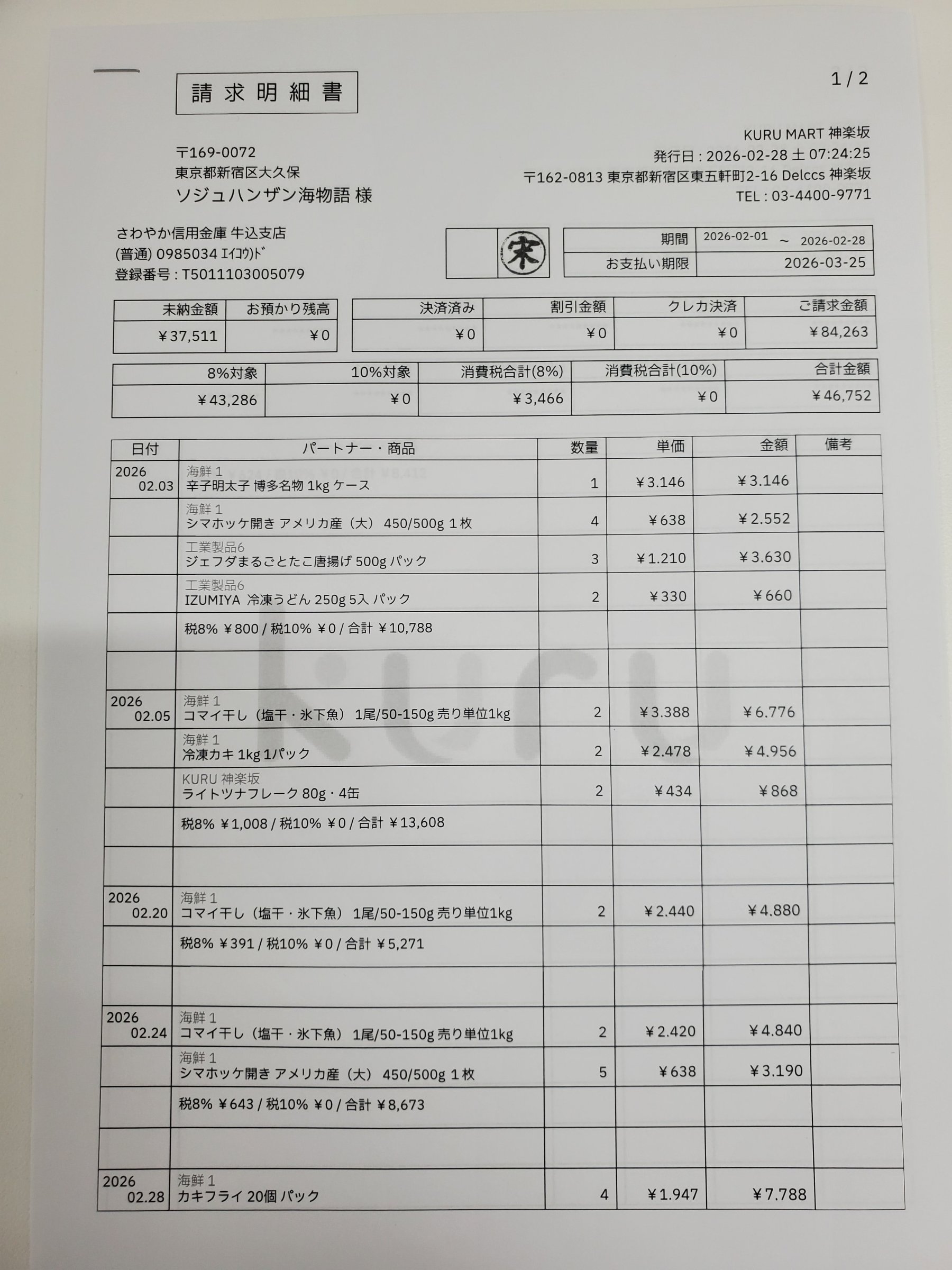
This is the core principle behind space-ocr's asynchronous processing. Instead of making a request and holding the connection open, you can upload a batch of invoices and immediately get back to work. The API returns a list of job identifiers, confirming the files were received. Our engine then processes each image. When an invoice is successfully read, a notification is sent directly to your application's endpoint. This is done using a webhook—a simple, reliable HTTP POST request containing the structured data.
The flow is straightforward: you make one POST /upload call with your invoice images. It takes multipart/form-data, up to 20 files per request, 20MB per file and 28MB for the request as a whole; anything larger comes back as 413. The call is asynchronous by default, so the response is a jobs[] array — one entry per file, each carrying a jobId and status: "pending". Later, your server receives an ocr.completed event via webhook. Every event shares the same envelope (event / deliveryId / occurredAt / apiVersion / data), and here data.result holds { values, cells, review, image }, the same v2 structure GET /jobs/{jobId} returns: values is the invoice data itself, from the supplier name, like "弥生サンブル", down to each line item; cells[path] carries the box and quad for that value on the page; and review.flagged is the work list of paths that deserve a human look. For reliability, every upload can include an Idempotency-Key header. If you need to retry a network request, sending the same key guarantees you won't create a duplicate processing job.
The fields themselves are declared once, on the sheet the invoices land in (POST /create with a columns array). Declarations never reach the model, so they do not make the extraction more accurate — what they add is a review signal and a deterministic parse:
invoice_no—requiredplus apattern: an absent number is flaggedmissing, a malformed onepattern_mismatch.invoice_date—type: "date", which puts the parsed value indata.normalizedand raisestype_mismatchwhen the printed date cannot be read as one.total—type: "number"withmin: 0, so a negative or unparseable amount surfaces asout_of_rangeortype_mismatch.supplier— anenumwhen you pay a fixed list of vendors; otherwisenear/not_near, naming the vocabulary that should (or should not) be printed beside the name, which surfaces asnear_mismatch/near_conflict.
A declaration never rewrites values. The parsed value lives in data.normalized, and the reasons arrive in review.flagged[].reasons — always an array, ranked, with the primary reason first.
const express = require('express');
const crypto = require('crypto');

const app = express();
const webhookSecret = process.env.SPACE_OCR_WEBHOOK_SECRET;

// The signature covers the raw bytes, so keep a copy before the JSON parser runs.
// Raise the parser limit too: an ocr.completed payload carries a cell per field.
const rawBodySaver = (req, res, buf, encoding) => {
  if (buf && buf.length) {
    req.rawBody = buf.toString(encoding || 'utf8');
  }
};
app.use(express.json({ verify: rawBodySaver, limit: '5mb' }));

// X-Spaceocr-Signature: t=<unix_ms>,v1=<hex>
// Canonical string: `${t}.${rawBody}` — HMAC-SHA256 with your webhook secret.
function verifySignature(secret, header, rawBody) {
  const m = /^t=(\d+),v1=([a-f0-9]+)$/.exec(header || '');
  if (!m) return false;
  const [, t, v1] = m;

  // Replay guard: reject a timestamp that drifts more than 5 minutes.
  if (Math.abs(Date.now() - Number(t)) > 5 * 60 * 1000) return false;

  const expected = Buffer.from(
    crypto.createHmac('sha256', secret).update(`${t}.${rawBody}`).digest('hex'),
    'hex',
  );
  const received = Buffer.from(v1, 'hex');
  return (
    expected.length === received.length &&
    crypto.timingSafeEqual(expected, received)
  );
}

app.post('/webhook', (req, res) => {
  const signature = req.get('X-Spaceocr-Signature');
  if (!verifySignature(webhookSecret, signature, req.rawBody)) {
    return res.status(400).send('Invalid signature');
  }

  // A redelivery reuses the same id, so it doubles as the de-duplication key.
  const deliveryId = req.get('X-Spaceocr-Delivery');
  const event = req.body; // event / deliveryId / occurredAt / apiVersion / data

  switch (event.event) {
    case 'ocr.completed': {
      // result = { values, cells, review, image } — the same v2 shape as GET /jobs/{jobId}.
      const { path, mode, result } = event.data;
      const flagged = result.review?.flagged || [];
      console.log(`[${deliveryId}] ${path} (${mode})`, result.values);
      if (flagged.length) {
        // Each entry is { path, reasons }; cells[path] holds box / quad / evidence.
        console.warn(
          `${flagged.length} field(s) to review:`,
          flagged.map((f) => `${f.path} -> ${f.reasons[0]}`),
        );
      }
      // TODO: post result.values to your accounting system, and hold the
      //       flagged paths for a person before the invoice is approved.
      break;
    }
    case 'ocr.failed':
      // The scan is refunded automatically; keep the payload for the audit trail.
      console.error(`[${deliveryId}] OCR failed:`, event.data);
      break;
    case 'webhook.test':
      console.log(`[${deliveryId}] test delivery received`);
      break;
    default:
      console.log(`Unhandled event type: ${event.event}`);
  }

  // Anything other than 2xx is retried: 1m -> 5m -> 30m -> 2h, 5 attempts in total.
  // Keep this fast — hand slow work to a queue instead of holding the response open.
  res.status(200).send({ received: true });
});

app.listen(3000, () => console.log('Webhook receiver listening on port 3000'));How does space-ocr locate data on the page? The underlying language model returns extracted text along with token hints pointing to their likely location. Our engine then performs a crucial verification step: it matches the extracted value, character-by-character, against the actual OCR symbols detected on the page. This process generates a match_ratio score from 0.0 to 1.0. A score of 0.85 or higher indicates a confident match. The final coordinates are returned as a 0-1000 normalized bounding box, independent of the original image's pixel dimensions.
Building this kind of automation should be accessible. Each image processed through the API costs $0.05, tax included. Every account gets 100 free scans each month. Importantly, if an OCR job fails because an image is unreadable, you are not charged. The cost is tied directly to successful data extraction, making it a low-risk way to start automating your payables.
- Expose a Public EndpointYour server needs a public URL. Use a service like ngrok for local development to expose your local server to the internet.
- Register Your Webhook URLAdd the endpoint URL under Webhooks in the space-ocr dashboard, or register it with `PUT /webhook` carrying `url` and `active: true`. The signing secret is returned in plaintext only once — when it is first minted, or when you re-issue it with `rotateSecret` — so store it right away.
- Implement Signature VerificationParse `X-Spaceocr-Signature` as `t=<unix_ms>,v1=<hex>`, compute HMAC-SHA256 over `${t}.${rawBody}` with your secret, compare it against `v1` in constant time, and reject a timestamp that drifts more than 5 minutes. Once it is wired up, send a `POST /webhook/test` delivery to exercise the whole path.
- Handle the 'ocr.completed' EventWhen a valid event arrives, read `data.result` — `{ values, cells, review, image }`. Write `values` into your accounting system and route every entry of `review.flagged` (each with a `path` and ranked `reasons`) to a person, using `cells[path]` to show where the value sits on the page.
- Upload an Invoice AsynchronouslyMake a `POST /upload` request with your files, up to 20 per request. The API immediately returns `jobs[]` with a `jobId` per file, without waiting for OCR to finish.
- Acknowledge Events and MonitorReturn a 2xx status quickly to acknowledge receipt; anything else is retried on the 1m → 5m → 30m → 2h schedule. Track deliveries with `GET /webhooks/deliveries` (filter by status, read `attempts` and `responsePreview`) or in the dashboard, and re-send a failed one with `POST /webhooks/deliveries/{deliveryId}/redeliver`.
What happens if my webhook endpoint is down?
How do I verify that a webhook request is actually from space-ocr?
Can I upload multiple invoices in one API call?
Is there a charge for failed OCR jobs?
What's the difference between polling and using webhooks?
How can I safely retry uploads from my application?
Start Automating Your AP Workflow
Get your API key and start building with 100 free scans every month.