AI OCR that you don't have to take on faith
space-ocr structures documents with a model, then cross-checks every value against the page: data.cells[path] returns box, quad, verified and review, and data.review.flagged is the review queue.
AI OCR sounds like the answer to messy documents: hand a receipt or an invoice to a model and get clean, structured fields back. The trouble is what happens when the model is wrong. A language model returns a confident, well-formatted value whether or not it actually read it off the page, and most tools pass that value on with no way to tell the difference.
space-ocr splits the job instead. A multimodal model does the structuring and never produces coordinates; a separate OCR pass reads the page and is the only source of geometry. The extracted value is then matched character by character against the symbols that pass detected. The response is separated the same way: data.values holds the business data in the schema you declared, and data.cells[path] holds the box, the quad, the verified verdict, the review reasons and the supporting evidence for that same path. Which OCR and model implementations run underneath is an implementation detail that can change — the response contract is what stays stable.
See the AI's output, checked
Hover any field below — the box on the receipt is where that value was actually located on the page, not where the model claimed it was. The values, boxes and verification flags here are read from a real parsed result, not a mockup.
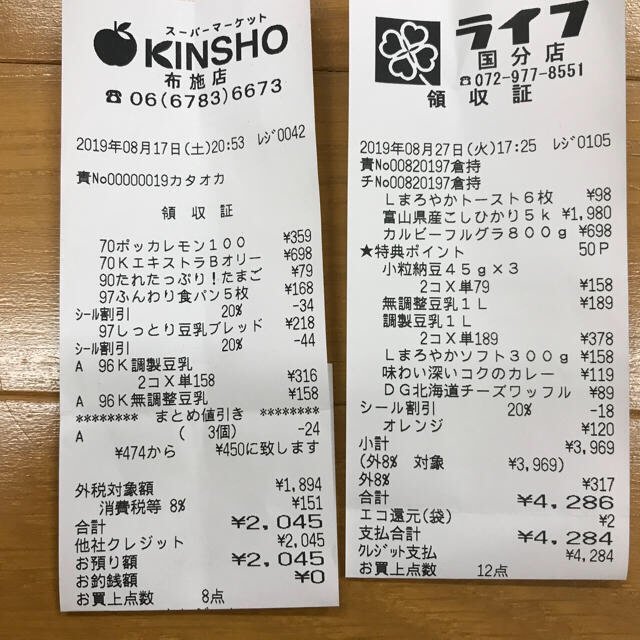
Each value with a box carries a verified on-page location — in data.cells[path], that is box + 4-point quad + evidence.match_ratio — on a 0–1000 normalized grid (0,0 top-left → 1000,1000 bottom-right), the same shape the live API returns. Hover a field to trace it back to the pixels it came from.
How AI OCR works in space-ocr
Send an image to POST /ocr/fields with imageType set to url or base64. An OCR pass reads the page first, and that pass is the only source of coordinates. A multimodal model then reads the document into the schema you declared and returns values only. Matching each value, character by character, against the detected symbols is what produces the box, the quad and the evidence in data.cells[path].
verified is a verdict, not a character score. It is false whenever the cell carries review reasons of any kind, true when a check ran and nothing was flagged, and null when there was nothing to check. The character comparison itself is evidence.text_match, which is why verified: false together with text_match: true is a normal combination: the glyphs agreed, and a rule you declared caught the value anyway.
Silent mismatches get surfaced this way, but nothing here promises to catch every error. The model and the OCR pass are independent and can still agree on the same misread. Coordinates are evidence of where a value came from, not proof that it is correct, so keep your own business rules downstream.
You do not have to write a schema. Declare fields, or set autoFields and let the model propose the structure. The web app rasterizes PDF pages before reading them; the public API takes raster images directly.
curl -s https://api.space-ocr.com/ocr/fields \
  -H "Authorization: Bearer $SPACE_OCR_API_KEY" \
  -H "Content-Type: application/json" \
  -d '{
    "image": "https://example.com/receipt.jpg",
    "imageType": "url",
    "fields": [
      { "name": "store_name", "type": "string", "required": true },
      { "name": "date", "type": "date", "required": true },
      { "name": "total", "type": "number", "required": true, "min": 0 },
      {
        "name": "items",
        "type": "array",
        "children": [
          { "name": "name", "type": "string" },
          { "name": "amount", "type": "number" }
        ]
      }
    ]
  }'
How to run AI OCR you can verify
- Send a documentPost an image to /ocr/fields with imageType set to url or base64. In the app you can drop a PDF and each page is rasterized first; the public API takes raster images.
- Declare the schemaPass fields with name, type and children, or set autoFields and let the model propose the structure. Add required, pattern, min, max, enum or near wherever a rule matters.
- Read the checked resultdata.values holds the business data, data.cells[path] the box, quad, verified verdict, review reasons and evidence, data.normalized the parsed values for declared scalar types, and data.image the frame that converts coordinates to pixels.
- Work the review queueIterate data.review.flagged, take reasons[0] as the primary reason, and draw that cell's box or quad over the page so a reviewer sees the region the value came from.
- Store and queryKeep results in a sheet with POST /create and POST /upload, then read them back with GET /view using where, sort, select and limit. Those reads are not charged and do not re-run OCR.
Simple, predictable pricing
One credit is one page processed, at $0.05 including tax, with 100 credits free every month and no credit card. Failed scans are never charged. Reading stored data back with GET /space, GET /view or GET /jobs is free. Flat plans add monthly credits, more sheets and storage.
What makes this AI OCR different from a model that just returns JSON?
Does the AI return the coordinates?
How do I know whether to trust a given value?
Can the AI propose the fields for me?
What happens to the original value when I fix the AI's output?
How much does it cost?
Use AI on your documents without trusting it blindly
Free tier — 100 credits a month, no credit card. Every value comes back with its coordinates, a review verdict and the evidence behind it.